Your docs, live.
Your repo, clean.
share-doc turns a folder of plain markdown into a live workspace for your team, and a fully legible one for your agents. Edit together in the browser. Keep every file on disk.
curl -fsSL https://sharedoc.brightmotion.io/install.sh | sh
Plain markdown, always
A folder of .md files on your disk, exactly what the editor shows. Open it in anything. Leave any time.
Live, together
Cursors, comments, history and chat, like the docs tools your team already knows, on files your tools can still touch.
Agent-ready
Your agent gets what you get: the files, the comments, the chat and the work queue. With a CLI built for it.
The problem
Your agents write in markdown. Your team works somewhere else.
Specs, plans, issue write-ups and research notes are markdown now, and an agent wrote half of them. So they end up in one of two places, and both are wrong.
Only engineers read them.
- Every doc edit is a pull request.
- Nobody comments on a diff of a paragraph.
- Nothing is live. Two people, two branches, one conflict.
The agent can't see them.
- It can't read the review, so it repeats the mistake.
- The copy drifts from the repo within a day.
- Nobody knows which version of the plan is true.
share-doc is one folder that is both. The files stay next to your code, where the agent works. Your team edits, comments and talks about the same bytes, live.
How it works
Point it at a folder. That's the setup.
- Install the CLI and log inOne line on macOS, Linux or Windows. Login is a browser approval, like
gh auth login. - Pair a folder with a project
sharedoc sync add lumen-app ~/Code/lumen/docs. An empty folder pulls the project down; a full one pushes up. - Let it run
sharedoc sync installkeeps every pair live in the background and updates itself. - Work however you likeEdit in the browser, in your editor, or let the agent do it. Every edit merges, and every save is a revision.
Write together
The editor your team expects. The file your agent needs.
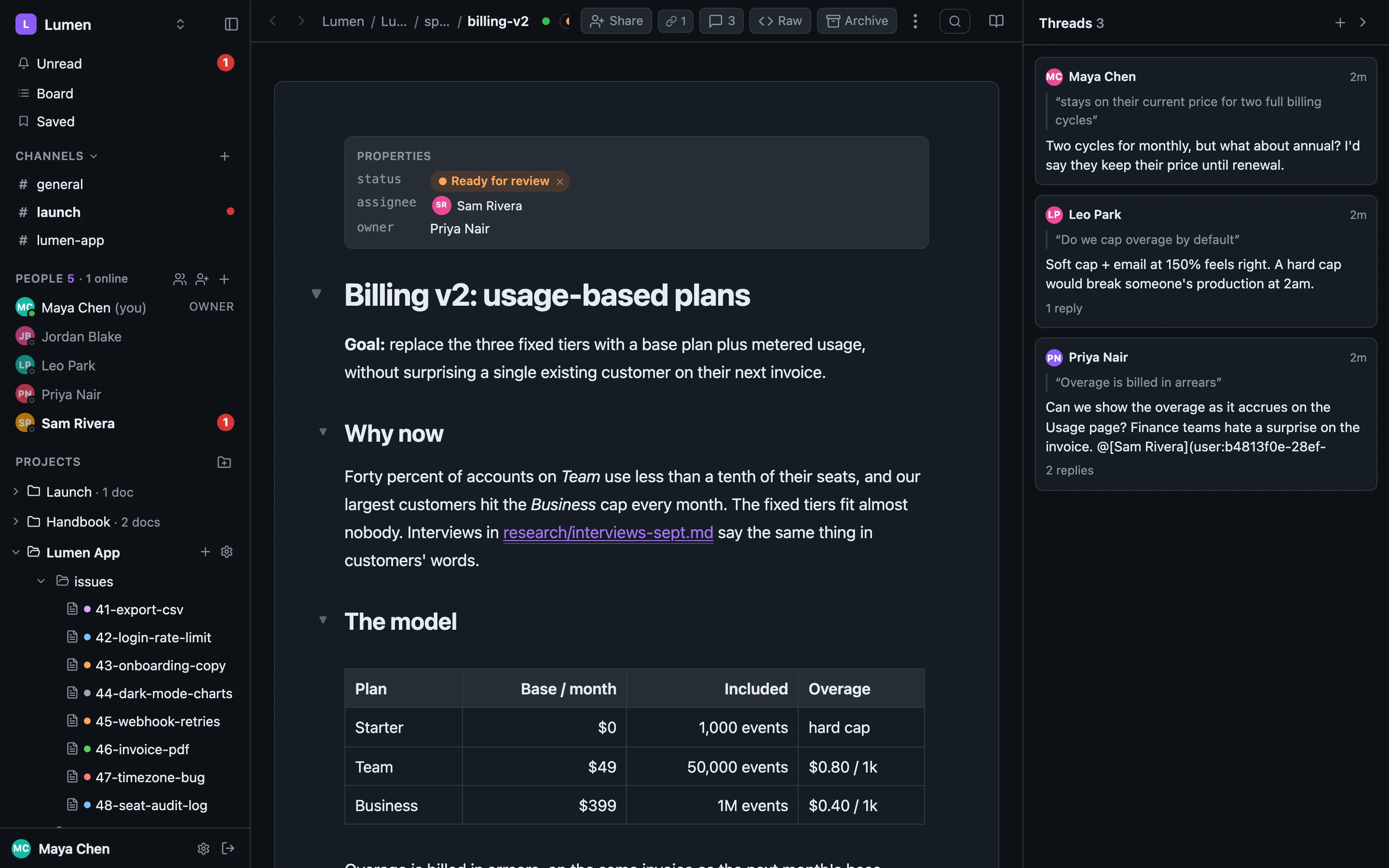
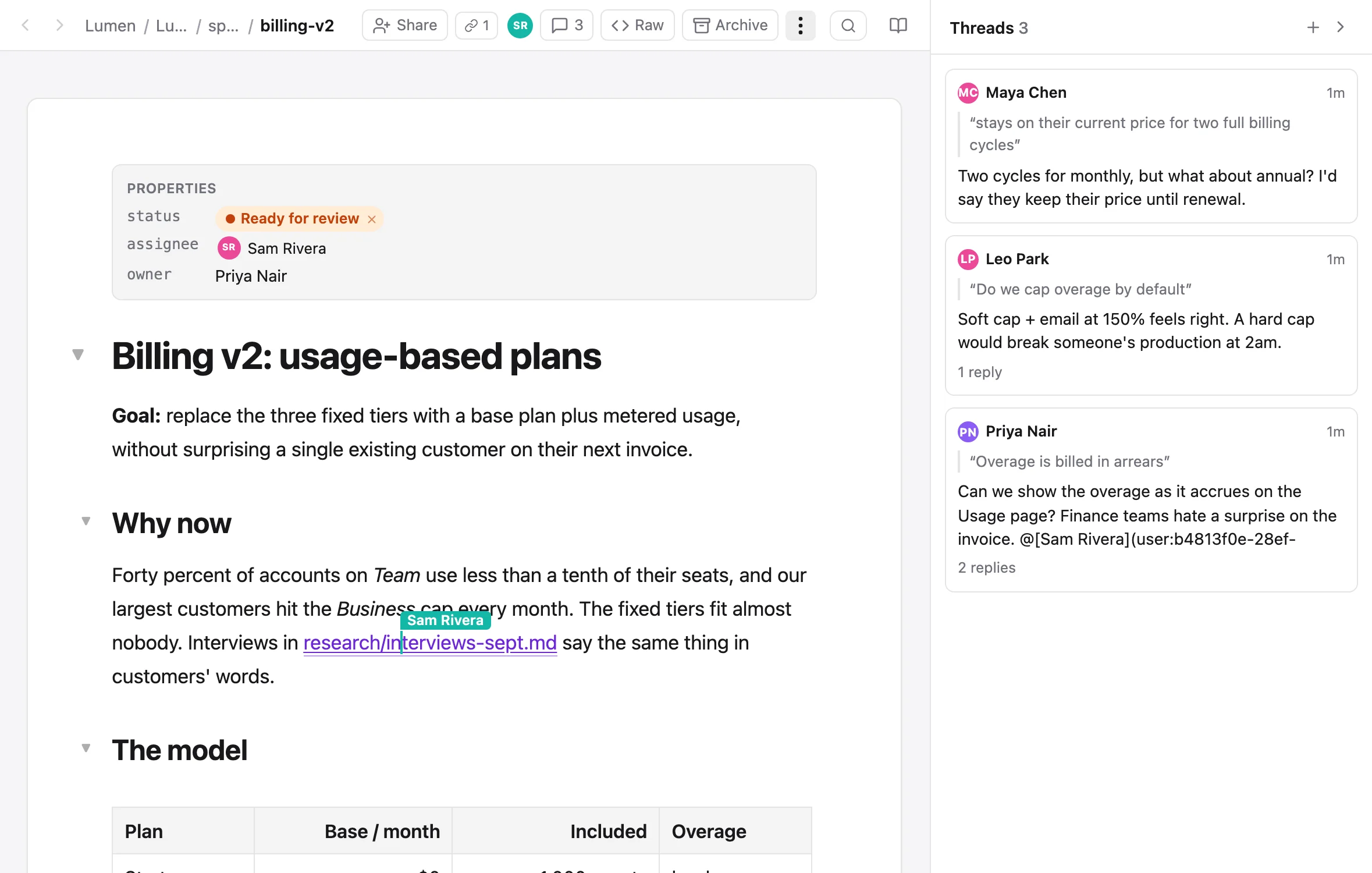
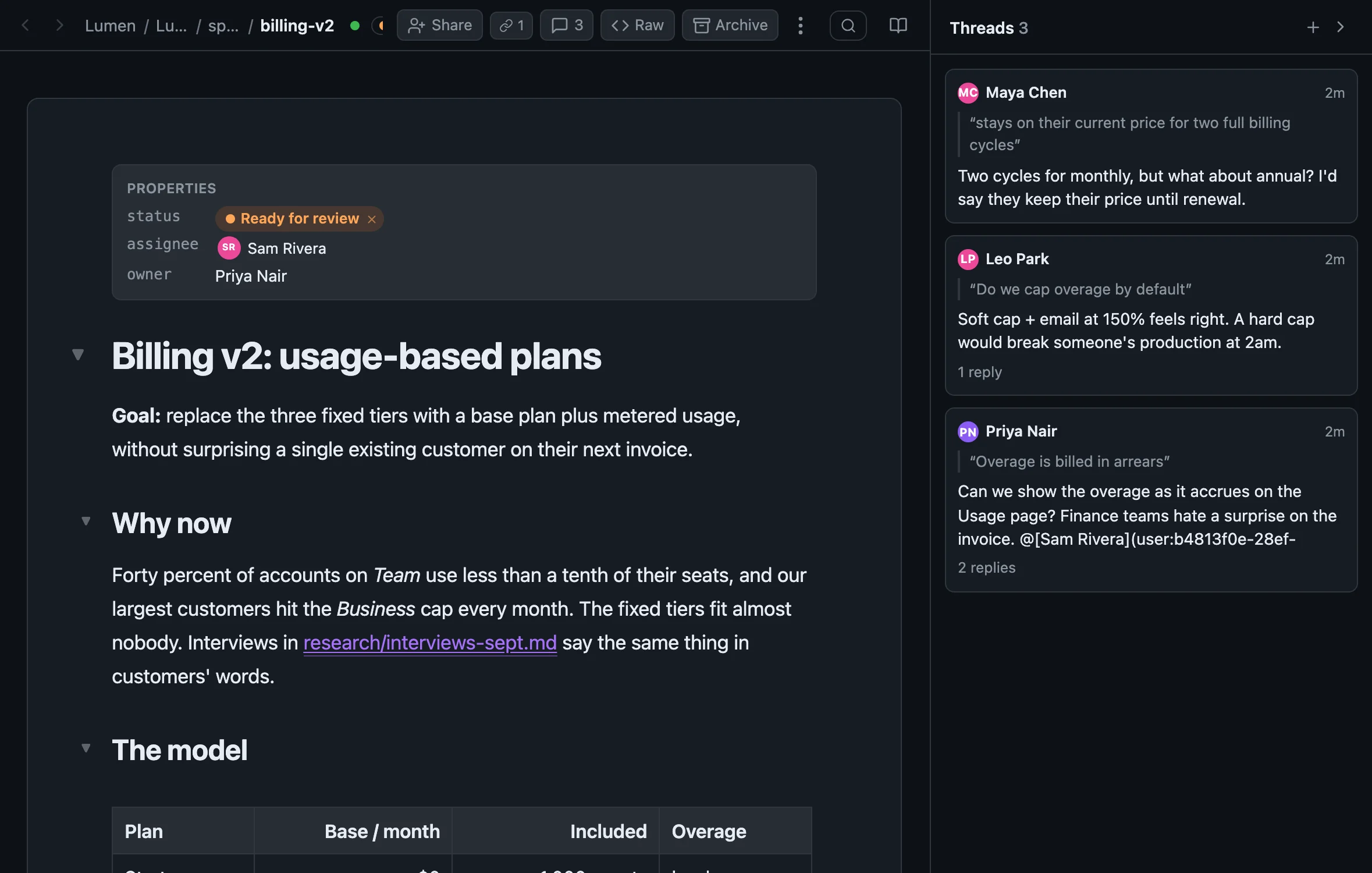
Real-time editing with cursors and presence, on a file that stays plain markdown: tables, task lists, front-matter, diagrams and images all survive the round trip.
- Comments anchored to the passage, with replies, reactions and resolve
- Notion-style tables: drag rows, sort, filter, paste from a spreadsheet
```mermaidfences drawn as diagrams, in light and dark- Revision history with author, agent, diff and one-click restore
Talk next to the work
A chat that knows which doc you mean.
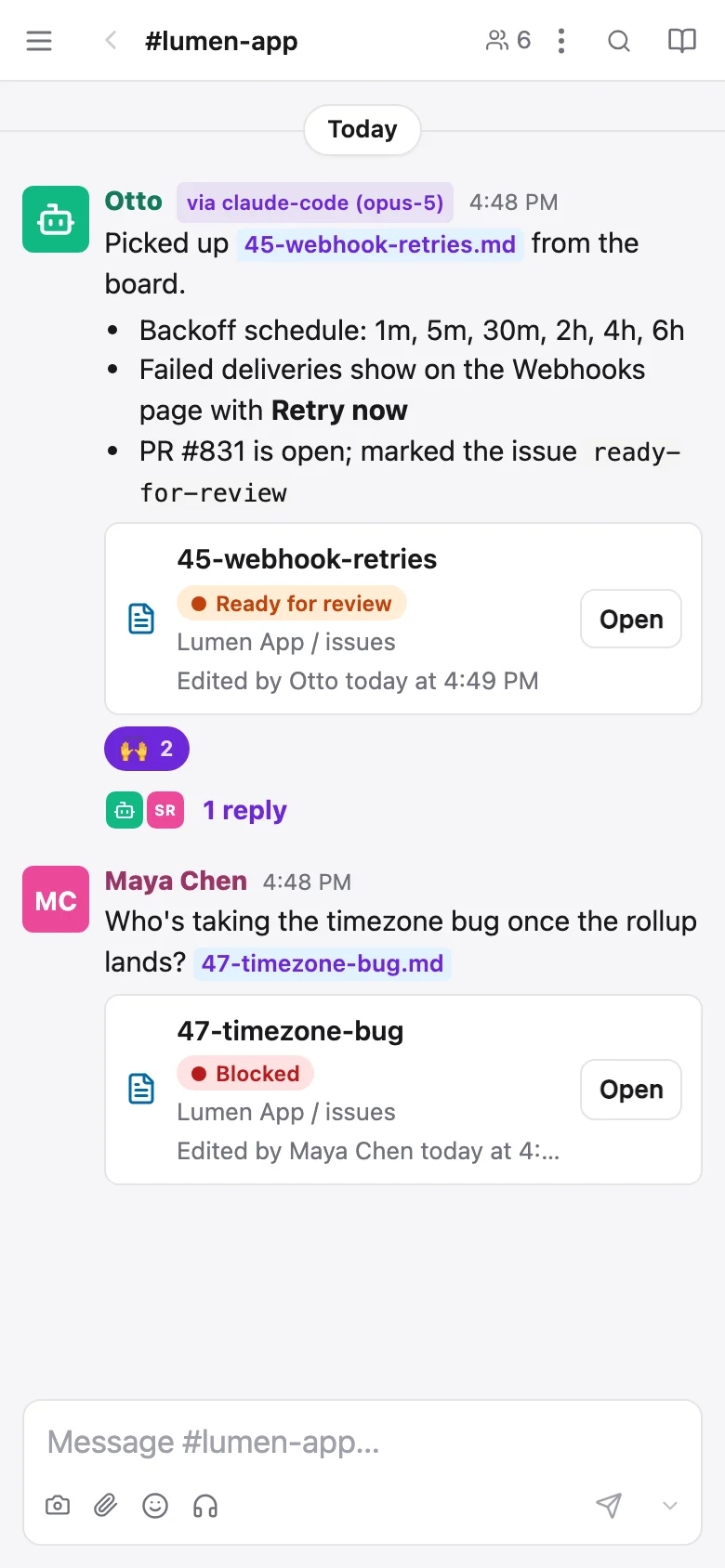
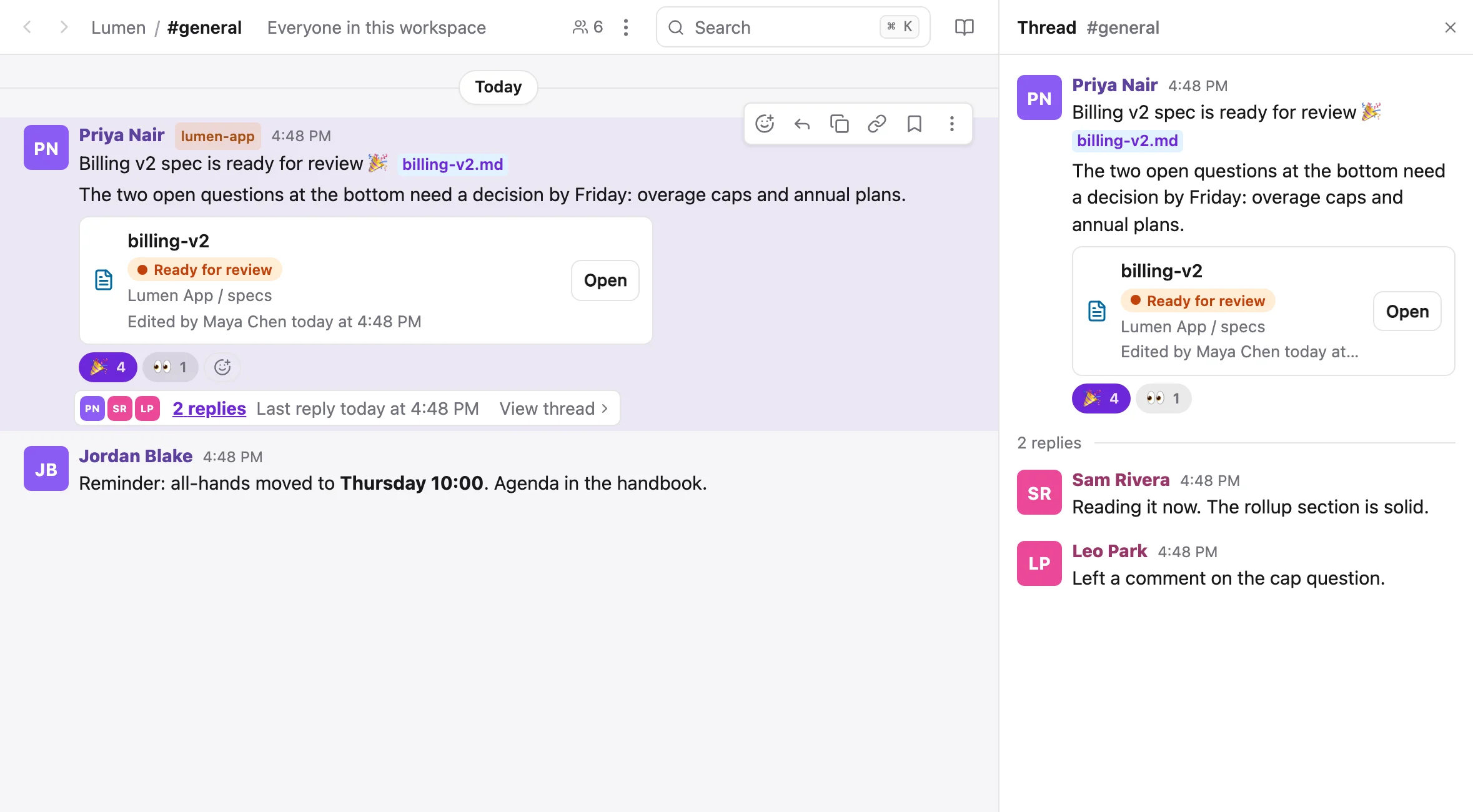
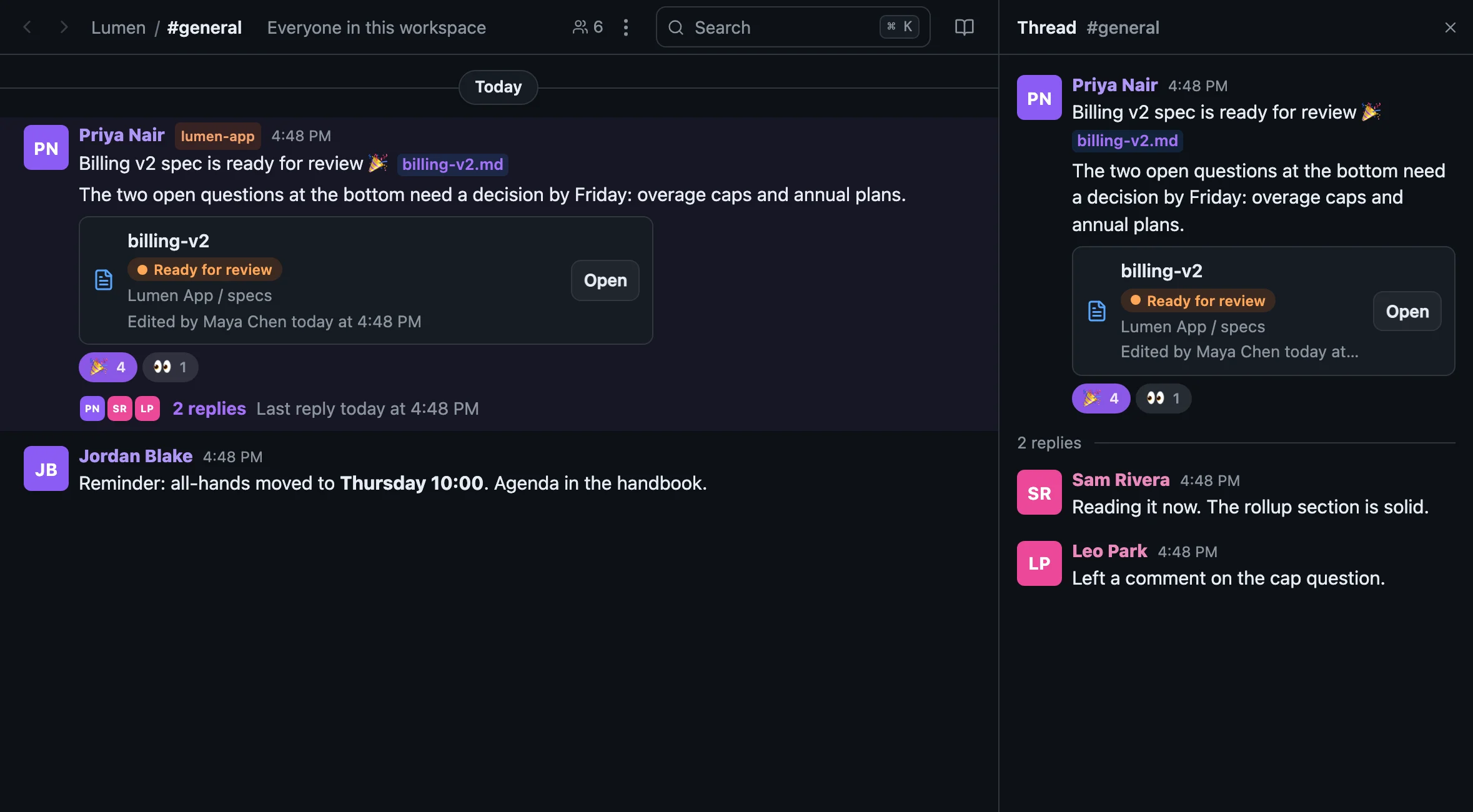
Channels, DMs and threads, built around the files. Link a doc and it unfurls with its live status. Label a post with the project it's about. Search all of it with ⌘K.
- Threads, reactions, @mentions, drafts and send later
/huddlefor an audio call right in the channel- Saved items and reminders, on messages and doc sections
- Bring your Slack channels and DMs in, two-way
Know what's moving
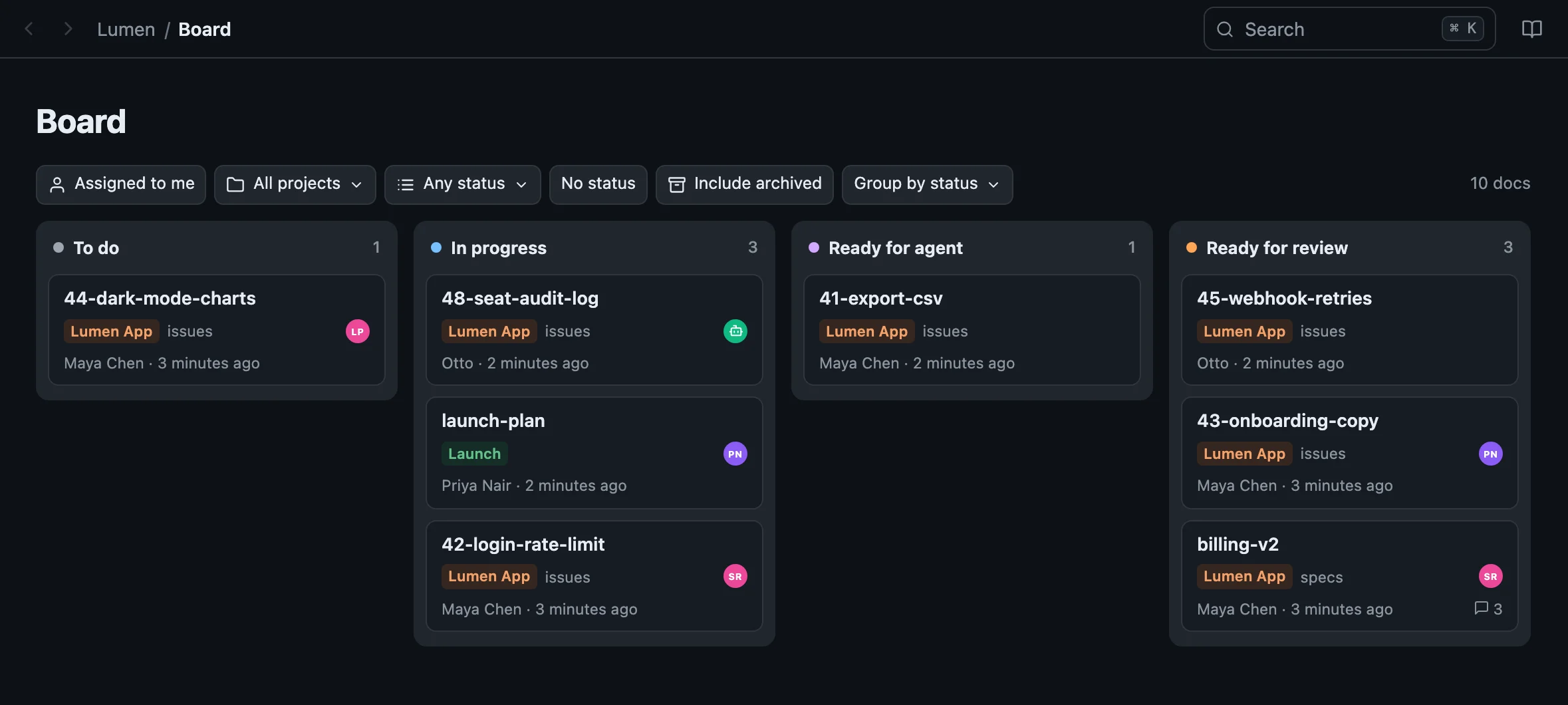
Statuses in the file. A board across every project.
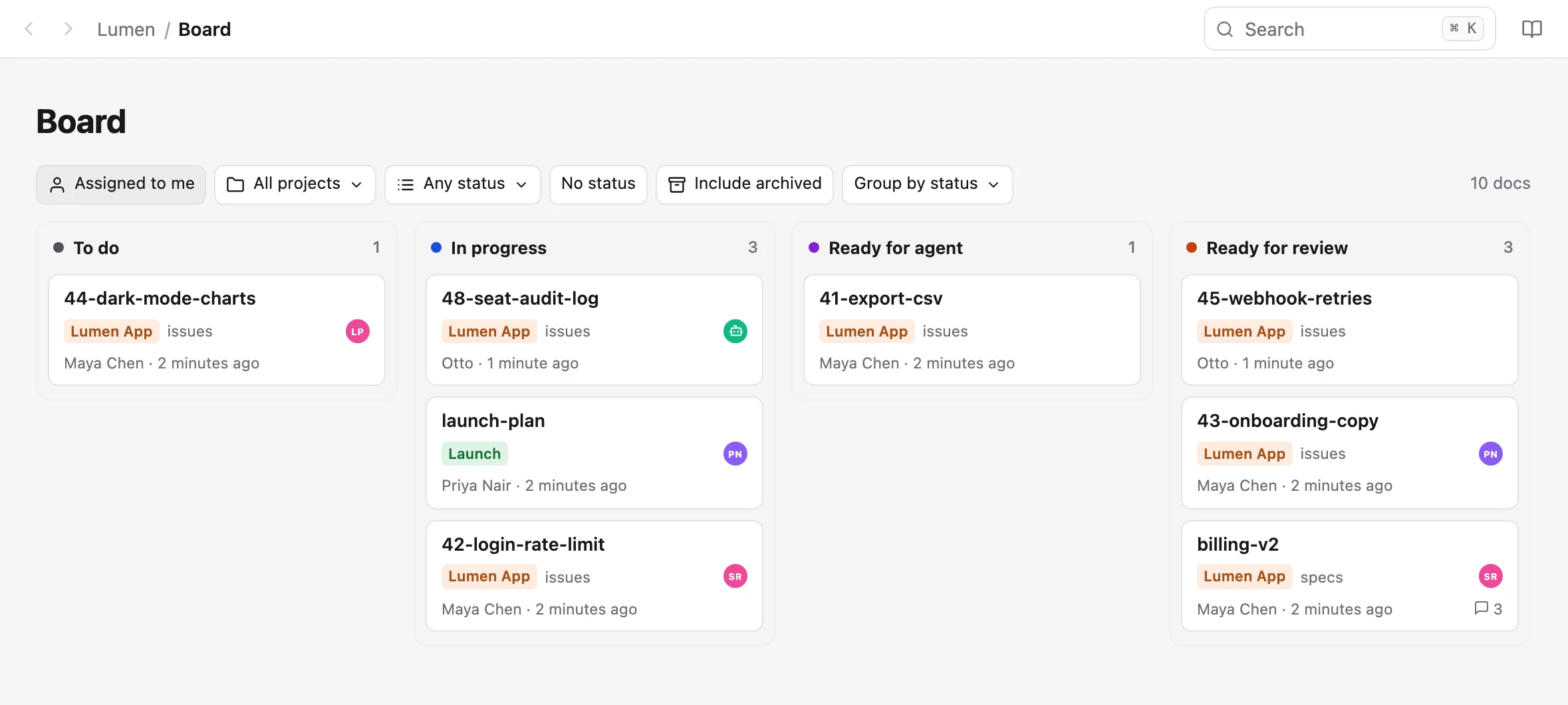
Put status: ready-for-agent in a doc's front-matter, or click a chip. The doc gets a dot in the sidebar, a card on the board, and a chip wherever it's linked.
- Drag a card to change the status, one revision, written back to the file
- Assign a doc to a person or to an agent
sharedoc docs list --status ready-for-agentfor your agent's queue
It's just markdown
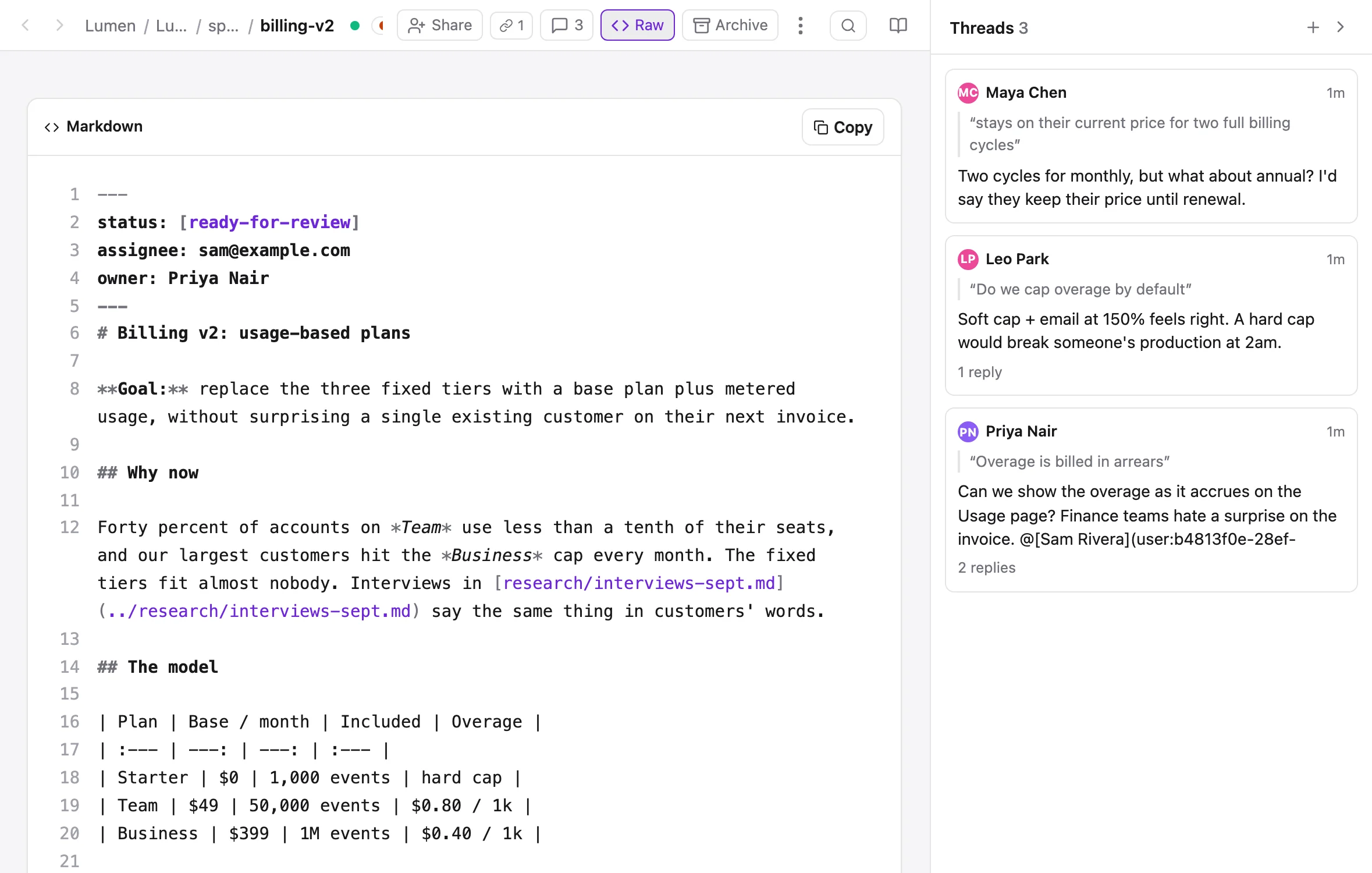
Flip to the source. It's the file on disk.
Raw shows the exact text sharedoc files cat prints and your editor opens, and you can edit it live while others type in the rich view. Nothing is converted, hidden or held hostage.
- YAML front-matter kept byte for byte, comments and key order included
- Images saved beside the doc in
media/, linked relatively, so GitHub renders them too - Delete means archive: closed, readable, one click to reopen
Built for agents
Your agent gets the same workspace you do.
Not an API bolted on later. The files are on its disk, the review is beside each file, the chat is mirrored as markdown, and every command speaks JSON.
--jsonon every command, stable exit codes,--dry-run, never a prompt- Comments land beside the doc as
billing-v2.md.comments.md - The whole chat mirrored to
~/sharedoc/chat/, one file per day - Agents of their own: a name, a photo, tokens, and no way to widen their own access
- Drafts with versions: it proposes three replies, you pick one
$ sharedoc docs list --status ready-for-agent
PROJECT    PATH                         STATUS
lumen-app  issues/41-export-csv.md      ready-for-agent
lumen-app  issues/45-webhook-retries.md ready-for-agent

$ sharedoc files status lumen-app \
    issues/45-webhook-retries.md --if-version 3 \
    --remove ready-for-agent --add in-progress
issues/45-webhook-retries.md v4 · status in-progress

$ grep -A5 '^## L22' specs/billing-v2.md.comments.md
## L22 · "Overage is billed in arrears" thread:108a3354-…

> Overage is billed in arrears

**2026-09-29 16:14Z · Priya Nair**
Can we show the overage as it accrues?

$ sharedoc thread reply 108a3354-… \
    --body "The rollup already writes period_total…"
replied to thread 108a3354-… · message 5e0f91c2-…
And the rest
Everything a team needs around its docs.
Every release is written up in the changelog. These are the parts people use every day.
A real editor
Tables you can sort and drag, mermaid diagrams, task lists, images, video. Markdown shortcuts as you type.
Comments on the passage
Threads anchored to the words they are about, with replies, reactions, follow and resolve.
History for every save
Who changed what, from the browser or an agent, with a diff and a one-click restore.
Raw markdown, live
Flip to the exact text on disk and edit it while others type in the rich view.
Statuses and a board
Front-matter statuses and assignees become chips, a sidebar dot and a board across projects.
Chat around the work
Channels, DMs, threads, reactions and project labels. Doc links unfurl with their live status.
Huddles
Type /huddle and you are talking. The post becomes the record of who joined and for how long.
⌘K finds everything
Files, folders, messages, comments, channels and people, with in:, from:, status: and more.
Sync you can trust
A background service, selective folders, 5 GB files in resumable parts, approval before a big push.
Share just a folder
Private projects, roles, join links, and file or folder shares that show nothing else.
Notifications that behave
Unread, push on desktop and phone, snooze, working hours, reminders and saved items.
Slack, brought in
Link Slack channels and DMs, read them here, reply to Slack as you, one unread for both.
Why not just…
Git is for code. Notion is for people. share-doc is for both.
| Docs in git | Notion / Google Docs | Obsidian + sync | Slack | share-doc | |
|---|---|---|---|---|---|
| Plain files on disk your agent can edit | ✓ | ✕ | ✓ | ✕ | ✓ |
| Live co-editing and comments | ✕ | ✓ | ✕ | — | ✓ |
| Non-engineers take part | ✕ | ✓ | some | ✓ | ✓ |
| Agent can read the discussion | ✕ | via API | ✕ | via API | ✓ |
| No pull request per doc edit | ✕ | ✓ | ✓ | — | ✓ |
| Chat next to the docs | ✕ | some | ✕ | ✓ | ✓ |
Questions
The ones people ask first.
Why not just keep the docs in git?
Keep the code in git. Docs change faster and involve more people, and a pull request per typo is how they go stale. With share-doc the docs are still plain files in your repo's docs/ folder, just gitignored and live: your product lead comments on the passage, your agent edits the file, and nobody reviews a diff of a paragraph.
Am I locked in?
No. Every connected machine has the whole folder as ordinary .md files, byte for byte what the editor shows, front-matter included. Stop the sync and you still have every file. Comments are written beside each doc as <doc>.comments.md, so even the review travels with the folder.
What stops an agent from making a mess?
Every write is a revision with an author (Maya · via claude-code (opus-5)), and restoring a version is one click. files put --base merges rather than overwrites, so an agent never clobbers someone typing. An agent can have an identity of its own that can edit content but can never invite people, share, change settings or mint tokens, and you can pause it in one click.
Will it upload my whole repo by accident?
It refuses a folder that holds .git and points you at docs/. It skips lockfiles, build output and dotfiles, reads a .sharedocignore, and lists what a first push will send. Turning a folder off never deletes anything.
Which agents does it work with?
Anything that can read files and run a command: Claude Code, Codex, Cursor, your own scripts. The files are on disk; the sharedoc CLI does the rest with --json on every command, and skill.md teaches the agent how to use it.
Does it run on Windows and on my phone?
The CLI and sync run on macOS, Linux and Windows. The web app installs as an app on iPhone, Android and desktop, with push notifications, editing with a formatting bar above the keyboard, and huddles.
Give your docs a home your whole team can reach.
Make a project, pair a folder, invite a teammate, hand your agent the skill.