Features
Search
⌘ K (Ctrl K elsewhere) searches everything you can open: file contents and paths, folders, chat messages, doc comments, channels and people. It's full-text over words and fuzzy over names, and it only ever shows what you're allowed to see.
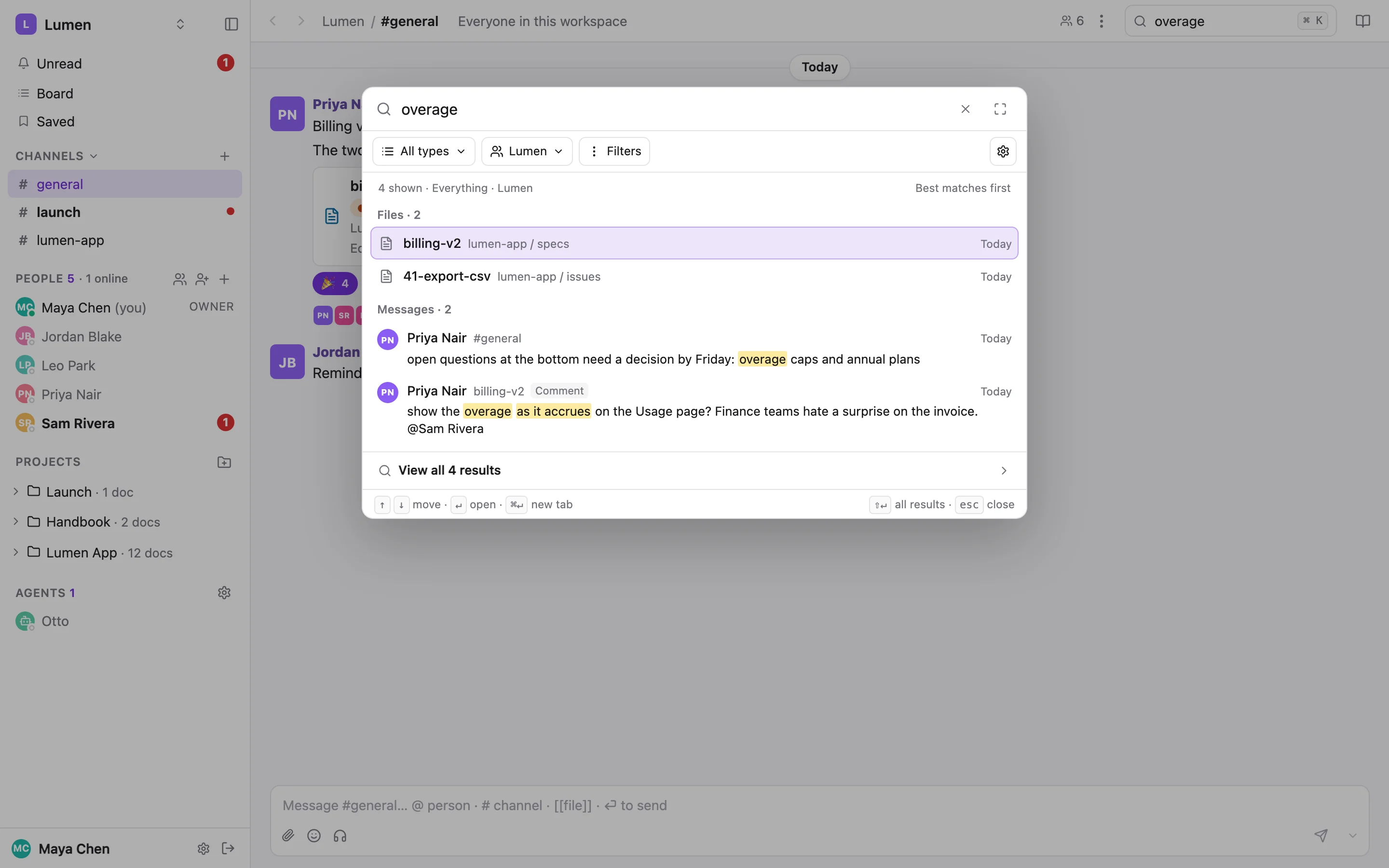
The search dialog#
Type and the results group by kind. Arrow keys move, Return opens, ⌘ Return opens in a new tab. A message or a comment opens at that exact message, briefly highlighted, with its thread expanded. Exact file names come before fuzzy ones. Image results show a thumbnail, and a larger preview floats beside the dialog as you arrow through.
The header's search box remembers what you last searched for on this device (it's never sent to the server), and ⌘K reopens with it selected so typing replaces it.
Types and workspace#
Under the field, Types picks any mix of Files, Folders, Messages, Channels and People, and Workspace picks this workspace, all your workspaces, or one you name. The placeholder and the result summary say the scope: Files and folders · Lumen. Folders are results in their own right, with their file count and last change.
Filters#
The Filters panel narrows to a project, a folder inside it, a channel, an author, a date range, a status or an assignee. It writes the same words into the query that you could type yourself, and the words you type show as chips you can remove. Filters never widen on their own: a name that can't be resolved, or a project you can no longer open, shows as such, with no results.
Query syntax#
| Write | To find |
|---|---|
"exact phrase" | The words together, in order |
-word | Results without that word |
in:#general | One channel |
in:lumen-app | A project: its docs, its channel, and any post anywhere labelled with it |
in:dm | Your direct messages |
from:me, from:[email protected], from:agent | Messages by a person (email or name), or written by an agent |
is:unread | Messages you haven't read |
has:file | Messages that tag a file |
after:7d, before:2026-09-01 | A date range, as a date or a relative age |
is:archived | Archived docs, which are left out otherwise |
status:blocked | Docs with that status. Repeat it for any of several. |
assignee:me, assignee:[email protected] | Docs assigned to someone (an email, a name, or an agent's name) |
is:unassigned, has:status | Docs with nobody assigned; docs with any status |
Only files have statuses and assignees, so a search for messages with status: says so rather than showing messages the filter never looked at.
webhook retries in:lumen-app after:7d
"soft cap" from:[email protected]
status:ready-for-agent is:unassigned
invoice -vat in:#general
status:blocked assignee:me
All results#
The dialog shows previews. View all results at the bottom (or ⇧ Return) opens /search with the query and every filter in the address, so the page can be refreshed, bookmarked and shared. Each group has Show more. Chat and doc comments are told apart (a Comment tag, or Chat only / Document comments only under Messages from), and matching messages can be grouped by thread. The breadcrumb reads the search back to you, Searching for “sync” in Lumen · Files + Folders, and a click copies a link to it.
Search settings#
The gear in the dialog sets the workspace mode and the types it opens with, and whether your last filters are remembered on this device (off by default). These are saved to your account; the query text never is.
From the CLI#
sharedoc search takes the same query language and returns ranked hits grouped by type. With --json, each hit carries where it is (a channel or a doc) and its thread id, so an agent can go straight to sharedoc thread show.
sharedoc search "overage" --json
sharedoc search "rollup" --types files,folders --project lumen-app --folder specs
sharedoc search "cap" --types messages --source comments --by-thread
sharedoc search --types files --in lumen-app            # no words: what is recent
sharedoc search "timezone" --from [email protected] --after 7d
sharedoc search "billing" --workspace all               # every workspace you can see
sharedoc search "export" --archived                     # archived docs instead of live ones
The flags --in, --from, --unread, --has-file, --after, --before and --archived are shorthand for the tokens above. --cursor continues a group. For docs by status and assignee across projects, sharedoc docs list is the more direct tool. Statuses & the board
Someone given one shared folder finds only that folder, with no siblings, channels or member list. A CLI token limited to some workspaces stays limited under All my workspaces, and every response says which workspaces it covered.