Guides
Docs in your repo
Your code stays in git and your prose moves to share-doc. Each repo keeps a docs/ folder on disk that is two-way synced with a project and gitignored. Your agent edits those files like any others, people read, comment and edit them in the browser, and nobody merges a doc in a pull request again.
Five steps: the first two once per machine, the rest once per repo.
Get the CLI#
Installcurl -fsSL https://sharedoc.brightmotion.io/install.sh | sh sharedoc login sharedoc whoamiLogin is a browser approval: tick the workspaces, pick read or write. Tokens are saved in
~/.config/share-doc/config.json(mode 0600), one per workspace. This is the only step that needs a person. In CI or a container, skip the browser and setSHAREDOC_TOKEN.Set up syncing#
sharedoc connectsyncs one folder in one terminal, which is fine for a demo. For daily work use the sync set: a list of folder ⇄ project pairs in~/.config/share-doc/sync.jsonthat one background process keeps live.sharedoc sync add lumen-app ~/Code/lumen/docs sharedoc sync add handbook ~/Code/handbook sharedoc sync add --channels # the chat, mirrored to ~/sharedoc/chat/ for your agent sharedoc sync list # what is configured sharedoc sync install # launchd on macOS, systemd --user on Linux sharedoc sync status # every pair: state, last push and pull, errorsPoint each pair at the repo's
docs/folder, never the repo root. An empty folder pulls the project down; a folder with files pushes what the project doesn't have yet.sync addandsync rmtake effect without a restart. On Windows, leavesharedoc sync runrunning in a terminal.macOS privacy foldersA launchd service gets no permission prompt for
~/Desktop,~/Documents,~/Downloadsor iCloud Drive, so reads there fail. Keep synced folders elsewhere in your home directory, or givebunFull Disk Access.Gitignore docs/#
A document that lives in both git and share-doc has two histories to reconcile, and one of them loses eventually. Pick one owner: git owns code, share-doc owns prose. Add to the repo's
.gitignore:.gitignore# docs/ lives in share-doc (synced by the sharedoc CLI), not in git /docs/If git already tracks
docs/, stop tracking it without deleting anything on disk:git rm -r --cached docs git commit -m "docs/ moves to share-doc"Do this after the folder's first successful sync, so the content is safely on the server first. The old commits keep their copy either way.
What stays in git:
README.md,CHANGELOG.md,TODO.md,CLAUDE.md/AGENTS.md, ADRs you want pinned to a commit, and anything a build reads. Specs, plans, notes, research and meeting outcomes go indocs/.Tell the agent#
A synced
docs/folder behaves unlike everything around it: edits are already shared, andgit statusnever mentions them. An agent that doesn't know this wastes a turn trying to commit a doc, or edits from a copy it read ten minutes ago. One section in the repo'sCLAUDE.mdorAGENTS.mdfixes both. The project'ssharedoc-instructions.mdand home page have it with your slug filled in:CLAUDE.md## `docs/` is synced, not committed `docs/` is a sharedoc folder paired with the `lumen-app` project. It is in `.gitignore` on purpose: a background service (`sharedoc sync run`) pushes local edits up and pulls remote edits down within seconds. - Edit files under `docs/` normally. No commit, no push. An empty `git diff` after editing a doc is correct. - Docs change under you when someone edits them in the web app. Re-read a file immediately before editing it. - `docs/.share-doc/` holds the pairing and sync state. Leave it alone. - A doc with open comments has a read-only `<doc>.comments.md` beside it. Read it; reply with `sharedoc thread reply <id>`; never edit it.The re-read rule is the one that matters. A confused
git statusthe agent can work out; a stale copy in its context it can't detect at all.Record the pairing#
Add a row to the Where this project is synced table in
sharedoc-instructions.md: repo, folder relative to the clone, the exact command, who and when.sync addends with a reminder, and an agent with the skill does it by itself. The next person to clone the repo then runs the same commands you did.
Joining a repo that's already paired#
A second clone changes nothing in the repo. Clone it, then run the command from the pairing table against your own path. The folder may be missing or empty; the first sync fills it.
git clone [email protected]:lumen/lumen.git ~/Code/lumen
sharedoc sync add lumen-app ~/Code/lumen/docs
sharedoc sync install
ls ~/Code/lumen/docs                  # README.md, specs/, issues/ …
What syncs and what doesn't#
| Kept local | Why |
|---|---|
| Dotfiles and dot-folders | .env, .github/, .share-doc/ never leave your machine |
| Lockfiles | bun.lock, package-lock.json, Cargo.lock and the rest |
| Build output at the folder's top | dist/, build/, out/, target/, coverage/, and __pycache__/ |
| Editor temp files | *.tmp.*, *~, swap files, *.part |
Whatever .sharedocignore lists | .gitignore syntax, at the folder's top. !/build/ brings a default back. |
.gitignore is deliberately not read: what stays out of git (the docs/ folder itself, PDFs, exports) is often exactly what the folder is there to share. A file the folder already synced keeps syncing whatever the rules say. A changed .sharedocignore applies the next time the sync starts.
The organization pass#
Synced docs pile up. A spec ships and becomes a description of the past; a plan gets superseded; three notes say the same thing. Rather than tidying all the time, point your agent at the folder now and then and let it read everything at once.
The two moves are archive and update. Archive is not delete: the doc moves to the project's Archived group and out of default search, stays readable at its URL, and sharedoc files reopen brings it back. That's what makes it safe to let an agent archive in bulk. Update means editing in place; the sync merges it into the live doc.
Do an organization pass on ./docs (synced to the share-doc project lumen-app).

1. Read every file, plus the last month of git log and the CHANGELOG.
2. Classify each doc: CURRENT, STALE, DUPLICATE, or ORPHAN.
3. Propose a list before you touch anything: what to archive, what to update,
   one line of why for each. Wait for me to approve it.
4. For what I approve:
   - update:  edit the file in place; fix what is now wrong, mark shipped
              sections as shipped. Do not rewrite for style.
   - archive: add a line saying what superseded it, then
              sharedoc files archive lumen-app <path> --yes
5. Post a summary to #lumen-app with sharedoc channel post, tagging each doc
   you touched as [[lumen-app/path.md]].

Never archive anything not on the approved list. Use --as-agent claude-code on writes.
Useful commands while it works:
sharedoc files list lumen-app --since 30d        # what changed recently
sharedoc files backlinks lumen-app specs/old.md  # who links here: an orphan check
sharedoc files history lumen-app specs/old.md    # versions, with authors
sharedoc search 'is:archived' --scope files      # what was archived
sharedoc files reopen lumen-app specs/old.md     # undo an archive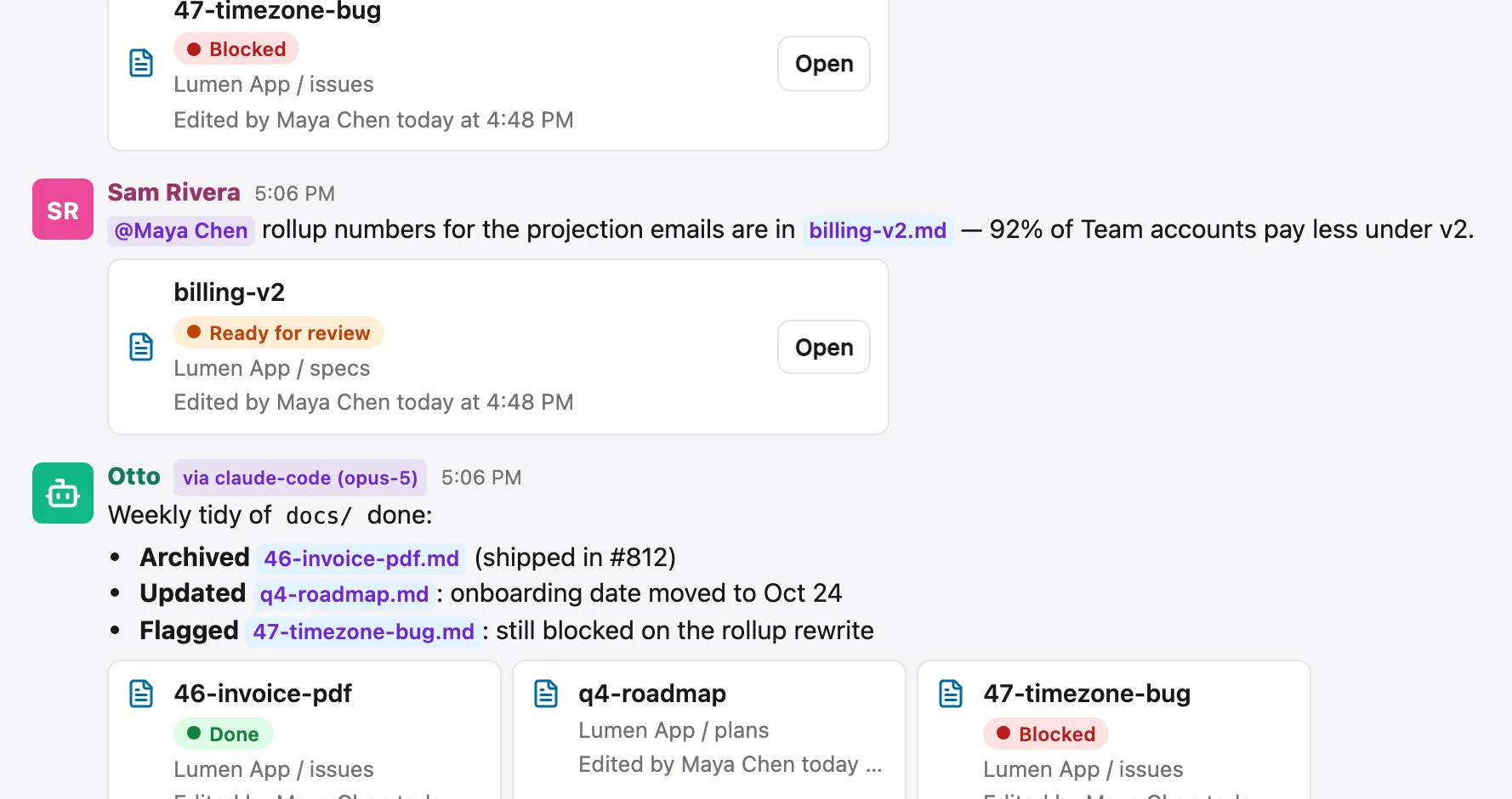
Pitfalls#
- Pair
docs/, not the repo root. The CLI refuses a folder holding.gitand names the folder you meant.--forcepairs the whole repo on purpose. - One engine per folder.
connectrefuses a folder that's in the sync set: two engines push each other's pulls. - Several workspaces? Pass
--workspace <slug>tosync addso the pair runs as the right login.
More on how the sync behaves: Sync. Handing the folder to an agent: Working with agents.