Features
Sync
A connected folder is an ordinary folder on your machine, kept in two-way sync with a project. You edit a file in your editor and it changes in the browser. Someone types in the browser and the file on your disk changes. The CLI does the work, as a background service or in a terminal.
Two ways to sync#
sharedoc connect syncs one folder for as long as the terminal is open. It's good for a demo, a one-off (--once) or a script. For daily work, use the sync set: a list of folder ⇄ project pairs in ~/.config/share-doc/sync.json that one process keeps live.
connect | The sync set | |
|---|---|---|
| Folders | One per terminal | As many pairs as you like, one process |
| Runs | Until Ctrl-C, or once with --once | As a service that starts at login and restarts if it dies |
| Chat mirror | No | Yes, with sync add --channels |
| Changes while running | Restart it | sync add / sync rm take effect without a restart |
The sync set#
sharedoc sync add lumen-app ~/Code/lumen/docs     # add a pair
sharedoc sync add handbook  ~/lumen-handbook
sharedoc sync add launch    ~/launch --strict      # this pair: conflicts instead of merges
sharedoc sync list                                 # what is configured
sharedoc sync install                              # run it as a service
sharedoc sync status                               # every pair: state, files, last push and pull, errors
sharedoc sync logs --follow                        # the service log
sharedoc sync rm ~/lumen-handbook                  # take a pair out; never touches files
sharedoc sync uninstall                            # stop the service; the set and every folder stay
An empty folder pulls the project down. A folder with files pushes what the project doesn't have yet. After that both sides stay converged. A pair that can't start (you're logged out, or not a member) retries on its own while the others carry on.
The service on each platform#
| Platform | What sync install does | Logs |
|---|---|---|
| macOS | A launchd user agent. It warns about folders under Desktop, Documents or Downloads, which macOS gates per app. | ~/Library/Logs/sharedoc/sync.log |
| Linux | A systemd --user unit at ~/.config/systemd/user/sharedoc-sync.service. A user service stops with your last session; loginctl enable-linger keeps it running headless. | The journal: journalctl --user -u sharedoc-sync |
| Windows | No service yet. Leave sharedoc sync run running in a terminal. | The terminal |
sync install waits up to 20 seconds for every pair to report live or an error before it returns. sharedoc update installs the new CLI and restarts the service onto it.
What syncs and what doesn't#
Every file in the folder syncs, not only markdown: images, PDFs, video, exports. These stay on your machine:
- Dotfiles and dot-folders.
.env,.github/,.share-doc/. Name a file without the dot if you want it shared. - Lockfiles and build output.
bun.lock,package-lock.json,Cargo.lockand the like,dist/,build/,out/,target/andcoverage/at the folder's top, and__pycache__/andnode_modules/anywhere. - Editor temp files.
*.tmp.*,*~,#*#, vim swap files,*.part,*.crdownload. The watcher also waits a beat after a file appears and checks it's still there before pushing it, so an atomic save goes up whole. - Comment sidecars.
<doc>.comments.mdis written by the sync and never pushed.
.sharedocignore#
A .sharedocignore at the folder's top, in .gitignore syntax, keeps more files local or brings a default back. .gitignore itself is deliberately not read: what stays out of git (the docs/ folder itself, PDFs, exports) is often exactly what the folder is there to share.
drafts/
*.psd
# sync build/ after all
!/build/
A file the folder has already synced keeps syncing, whatever the rules say. A changed .sharedocignore applies the next time the sync starts.
connect and sync add refuse a folder that holds .git and name the folder you probably meant (…/docs). A root pair would upload the README and the source code alongside the docs. --force pairs the whole repo on purpose.
The first push, and approvals#
A folder's first sync says what it will send before it sends it: the file count and size, the biggest top-level folders, and what is skipped. A folder that has synced before is never asked again.
If the first push is big (over 50 files or 20 MB), the CLI warns you, points at .sharedocignore for anything that should stay local, and sends it. A big folder never sits waiting.
In a workspace that has turned Accept large files off (workspace settings → Storage), a big first push is held instead: the folder is registered and waits. Project settings → Connections shows what it would send, with Approve and sync, Choose folders first and Don't sync. Settings → Devices marks it Waiting for approval. From a terminal:
sharedoc sync status                   # lists what is waiting
sharedoc sync approve 1a2b3c4d          # approve a folder's first push
sharedoc sync add lumen-app ~/big --yes # or send it straight away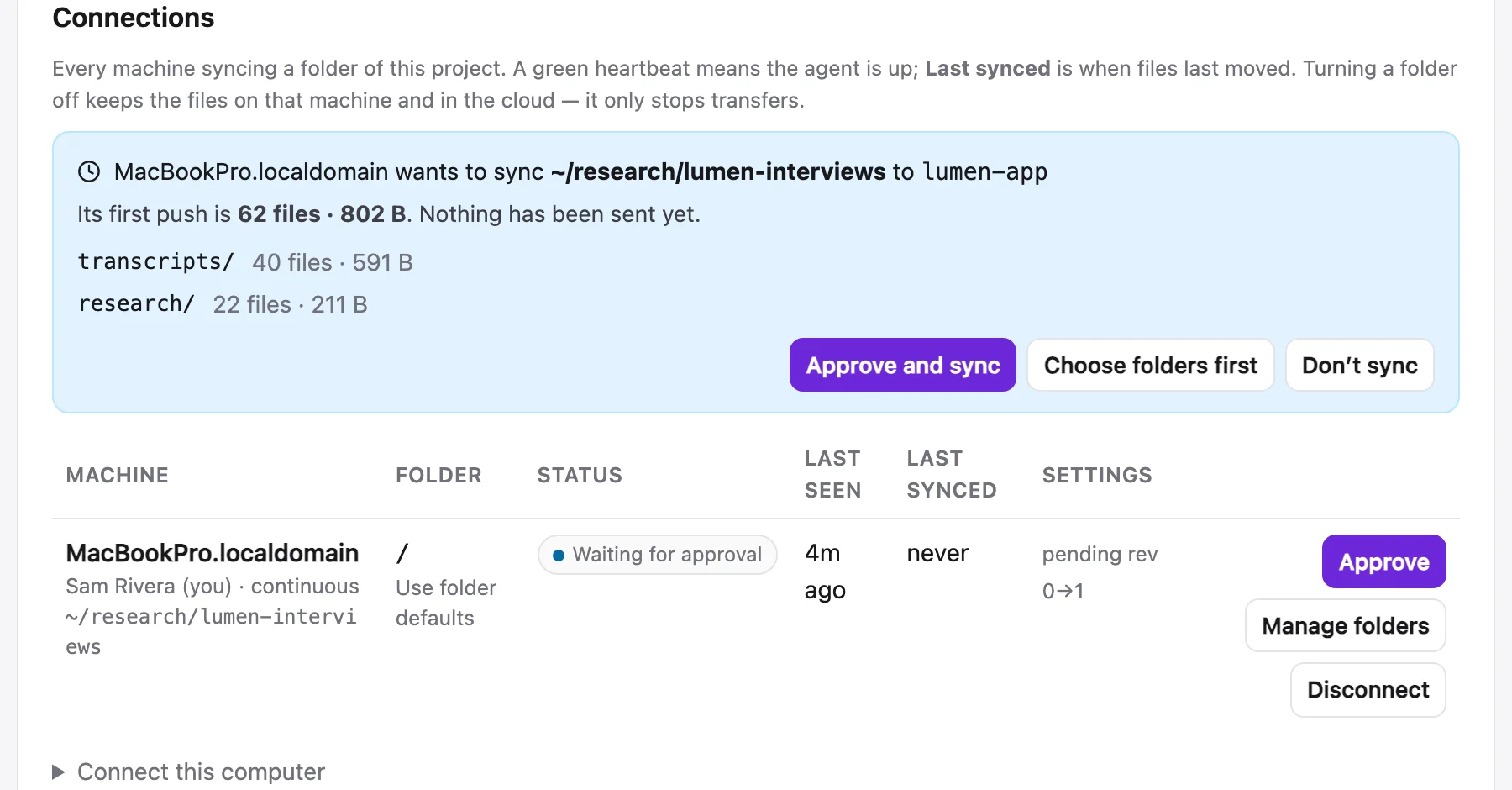
Big files#
A connected folder sends and receives files up to 50 GB each, without asking: every workspace accepts large files unless an owner or admin turns that off. Video, audio, design files and exports go straight to storage in 16 MB parts, several at a time. A part that fails is retried. An interrupted sync of a 4 GB video picks up where it stopped the next time it runs.
- A file is never held in memory: a 4 GB file uses about the same ~300 MB as a small one.
- A file still being written (an export, a render) is sent once it stops changing.
- A download is written beside the file and swapped in at the end, so an interrupted one never leaves a broken copy under the real name.
Owners and admins manage this under workspace settings → Storage: Accept large files (on by default) and the workspace total (100 GB by default). With large files off, a per-file limit (5 GB by default) and an ask-first size (1 GB by default) apply. Files over the ask-first size wait for a yes before they upload or download. They're listed on project settings → Connections with Approve and Approve all, or approve them with sharedoc sync approve <id> --held (or --file <path>). A file that changes after approval asks again. Browser uploads and files put never ask. A file over a limit is refused before anything is sent, with the limit and by how much. Uploads nobody finished are cleared after a day.
Edits, merges and conflicts#
Everyone can edit at once: the browser, a synced folder, an agent's files put. A folder's change is merged into the live document with a three-way merge against the version the folder last saw. Edits to different sentences of one paragraph both land, and a change already present on both sides counts once. A hunk that truly conflicts keeps the document's side and is reported, never guessed.
--stricton a pair (or onconnect/sync run) makes overlapping edits a conflict: nothing is applied, and--onceexits with code 4.- Moves follow. A file moved on the server (
files mv, or in the web) is renamed in every connected folder, at once or on the folder's next run. An edit made to the old copy goes with it. Moved somewhere this folder doesn't sync: an untouched copy is removed; an edited one is kept and reported. - Deletes archive. Deleting a synced file on disk archives the doc: closed, not gone, reopenable with
sharedoc files reopen. Files & media - A missing folder deletes nothing. If the synced folder itself goes (deleted, moved, an unmounted drive), nothing is archived and the folder isn't re-created. The connection shows missing in
sync statusand on project settings → Connections. Put the folder back and it resumes;sharedoc sync rm <dir>unpairs it and leaves the server as it is;sharedoc sync archive-missing <dir> --yesarchives what it held, if that is what you meant. - Big deletes wait for a yes. More than 25 files deleted at once are held, not archived, until you approve them: Archive or Keep them on project settings → Connections, or
sharedoc sync approve <id> --deletes/sharedoc sync discard <id> --deletes. Keeping them, or putting the files back, brings them back into the folder. - One undo. The files one burst of deletes archived are reopened together: Undo on the connection, or
sharedoc sync undo <id>(--listshows recent bursts). - Nothing comes back by accident. A file this folder synced that the server no longer has, with no move or archive to explain it, is kept on disk and not re-uploaded. The sync lists it; delete it to let it go.
connect --resetmoves the folder aside into.share-doc/backup-<timestamp>/and re-seeds it from the project. It never deletes.
Connections#
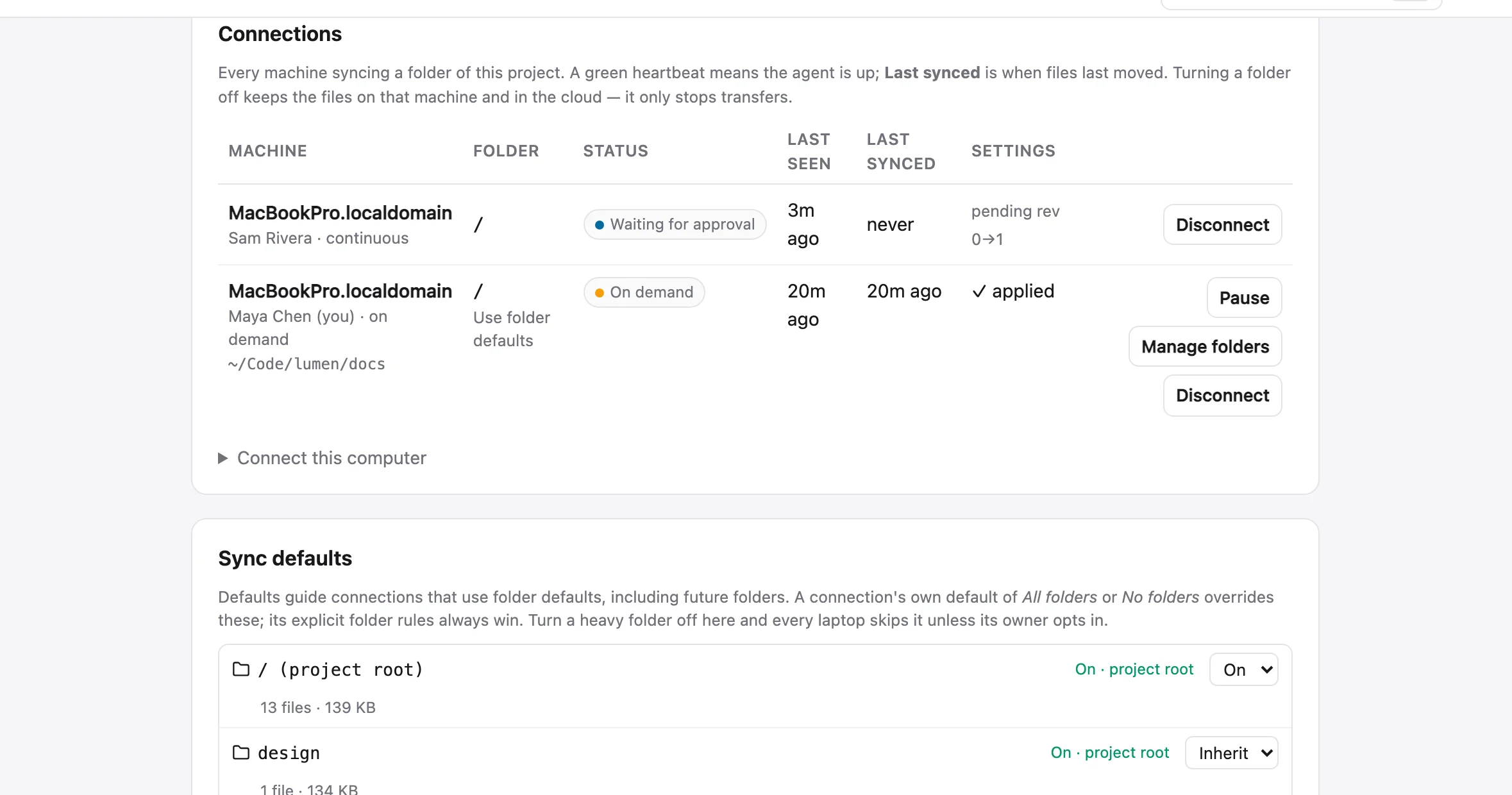
Every synced folder is a connection: one per machine and directory, registered with the hub before the first byte moves. Project settings → Connections lists each machine, who owns it, the folder it maps, whether the agent is up and, separately, when files last moved. Settings → Devices groups your own connections by machine.
sharedoc sync endpoints --project lumen-app   # status · last seen · last synced · settings applied
sharedoc sync pause 1a2b3c4d                  # transfers stop, rules kept, local edits wait
sharedoc sync resume 1a2b3c4d
sharedoc sync disconnect 1a2b3c4d --yes       # revokes its credential; files stay everywhere
sharedoc devices list
sharedoc devices rename <device-id> "Maya's laptop"
sharedoc devices disconnect <device-id> --yes
Disconnecting never touches a file, on disk or in the cloud. The service never revives a connection that was disconnected from Settings; reconnecting is a new sync add or connect.
Selective sync#
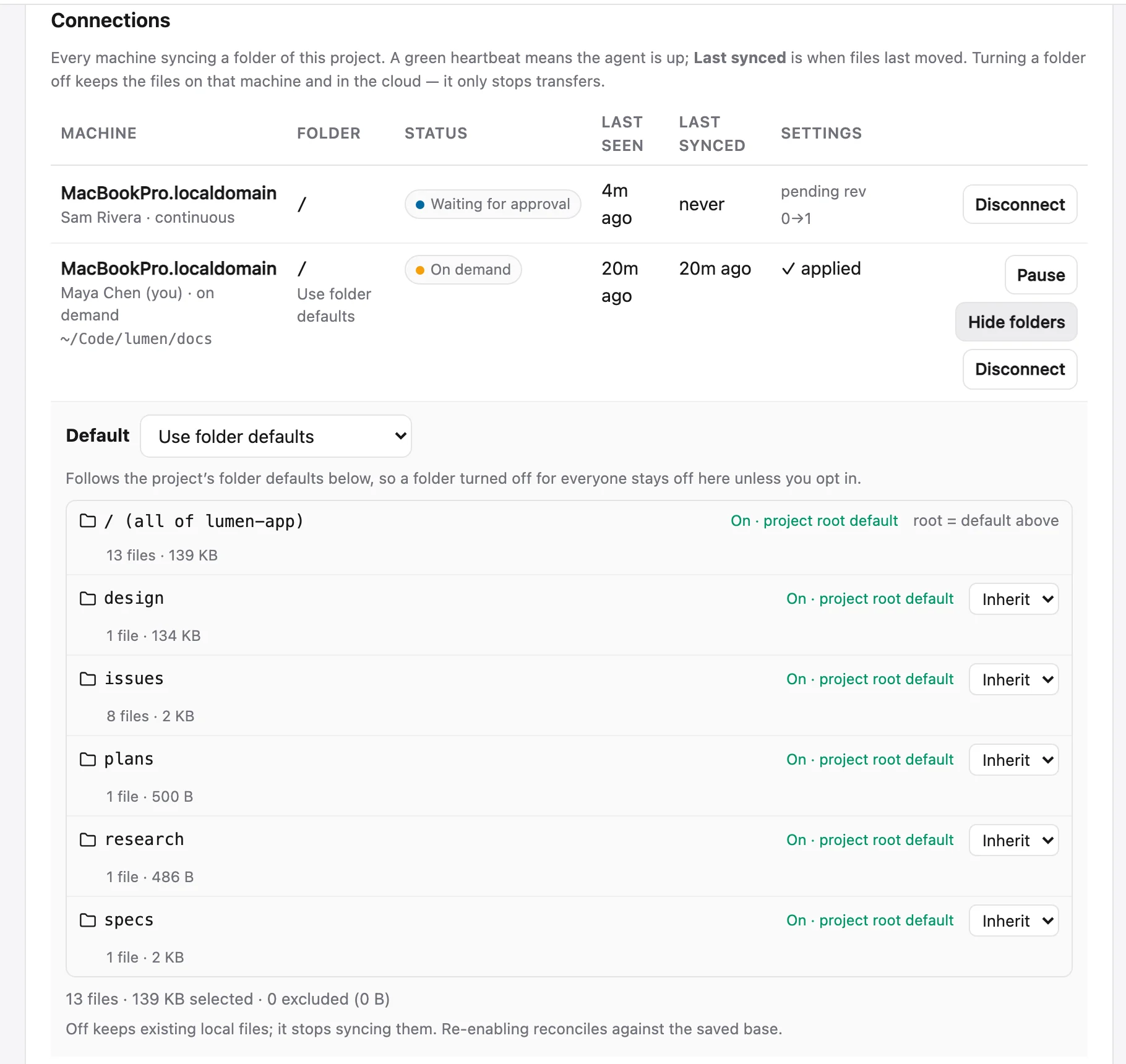
Each connection can sync part of a project. Manage folders on your own connection shows every folder with On, Off or Inherit, its effective state and why, and its file count and size. A narrower On beats an ancestor Off.
What a folder does is decided in this order:
- The nearest explicit folder rule on this connection.
- The connection's default: Use folder defaults, All folders unless excluded or No folders until selected.
- The nearest folder default the project's managers set.
- The project root's default: On, unless a manager has set it Off.
sharedoc sync folders 1a2b3c4d                          # the tree: rule, effective, why, files, size
sharedoc sync folders 1a2b3c4d set media --mode off
sharedoc sync folders 1a2b3c4d --default off            # no folders until selected
sharedoc folders settings media --project lumen-app --sync-default off   # a project default
sharedoc connect lumen-app ./specs --folder specs --sync-default off --once # map one sub-folderTurning a folder off stops transfers. The files stay on disk and in the cloud. A local edit made while it was off is merged when you turn it back on, and deleting an excluded file archives nothing.
The chat mirror#
The sync set can also mirror chat to disk as read-only markdown, so an agent working in a folder can read the discussion around it. One folder per conversation, one file per day, replies nested under their post, and the thread:<id> on every post line.
sharedoc sync add --channels                  # every channel you can see → ~/sharedoc/chat/
sharedoc sync add --channel general,lumen-app # just these
sharedoc sync add --channels --dms            # DMs and group DMs too (off unless asked)
sharedoc sync add --channels --history 30d    # how far back to backfill
The mirror never marks anything read, and edits to the transcripts are overwritten. To take part, reply with sharedoc thread reply <id>. Working with agents
Updates and the schema#
The browser, the hub and every CLI share one document schema. A client built for a different schema is refused before a byte of a document is sent, so an old client can never strip something it doesn't understand. When the hub's schema is newer than the installed CLI, the service runs the installer and restarts itself; sync status says updating meanwhile. A foreground run is told to run sharedoc update.
Troubleshooting#
| You see | It means |
|---|---|
refused in sync status | The hub is turning the service away: an expired login, or a build older than the hub's schema. The error column says which. sharedoc login or sharedoc update. |
| A pair stuck on retrying, or "pass --workspace" | Your login sees several workspaces and the pair doesn't say which. sharedoc sync rm it and add it again with --workspace <slug>. |
| Files bouncing back and forth | Two engines on one folder. Use the service or connect, never both. connect refuses a folder in the sync set unless you pass --force. |
| Nothing is uploading | A first push or a big file waiting for approval (only with large files off). sharedoc sync status lists what is waiting. |
| A file never appears in the project | It's a dotfile, a lockfile, build output, a temp file, or in .sharedocignore, or its folder is Off for this connection. |