Features
Comments & history
A comment is a thread anchored to the words it's about. People reply, react and resolve it in the browser; your agent reads it in a file beside the doc and replies from the terminal. Every save to the doc, by anyone, is a revision you can diff and restore.
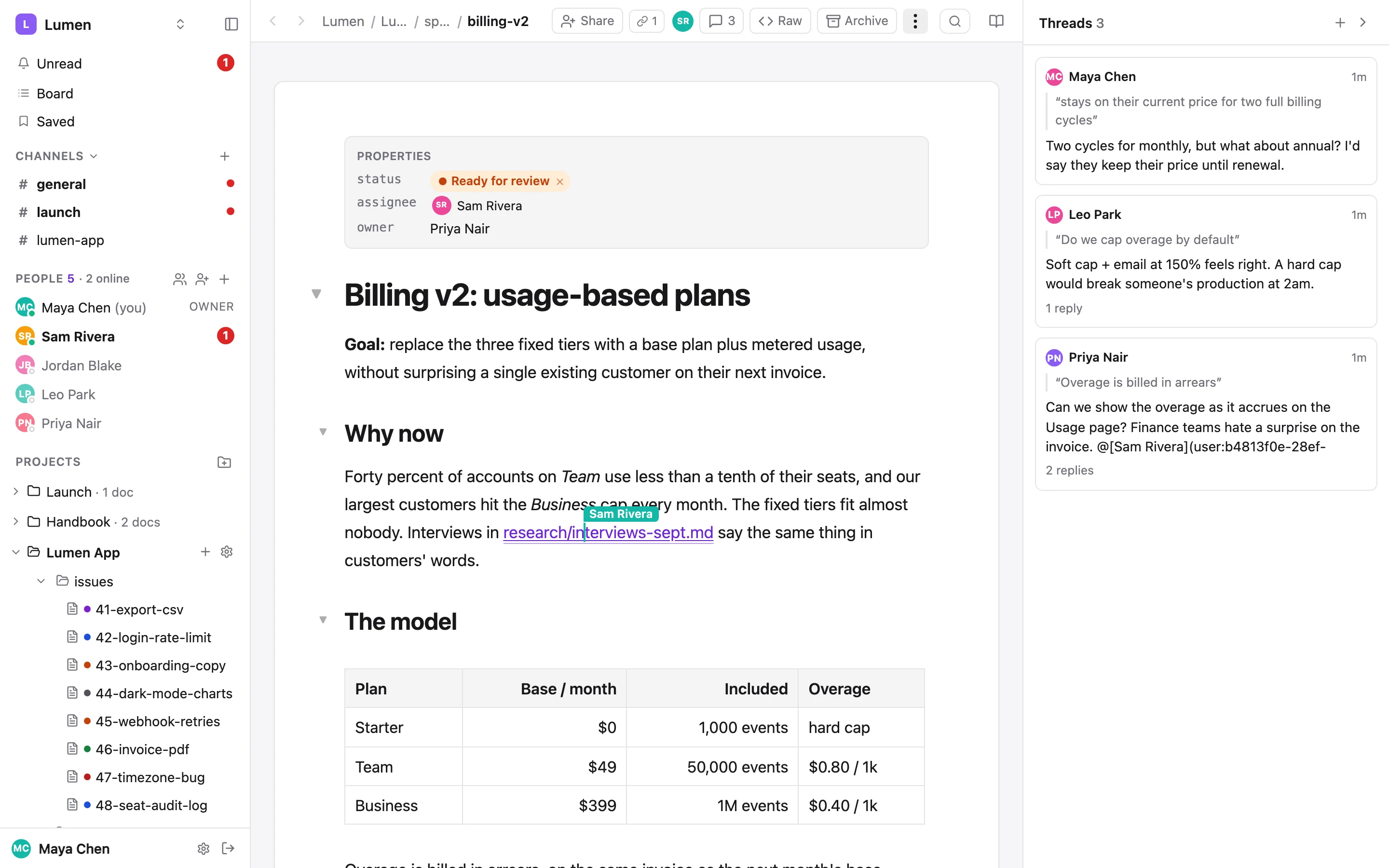
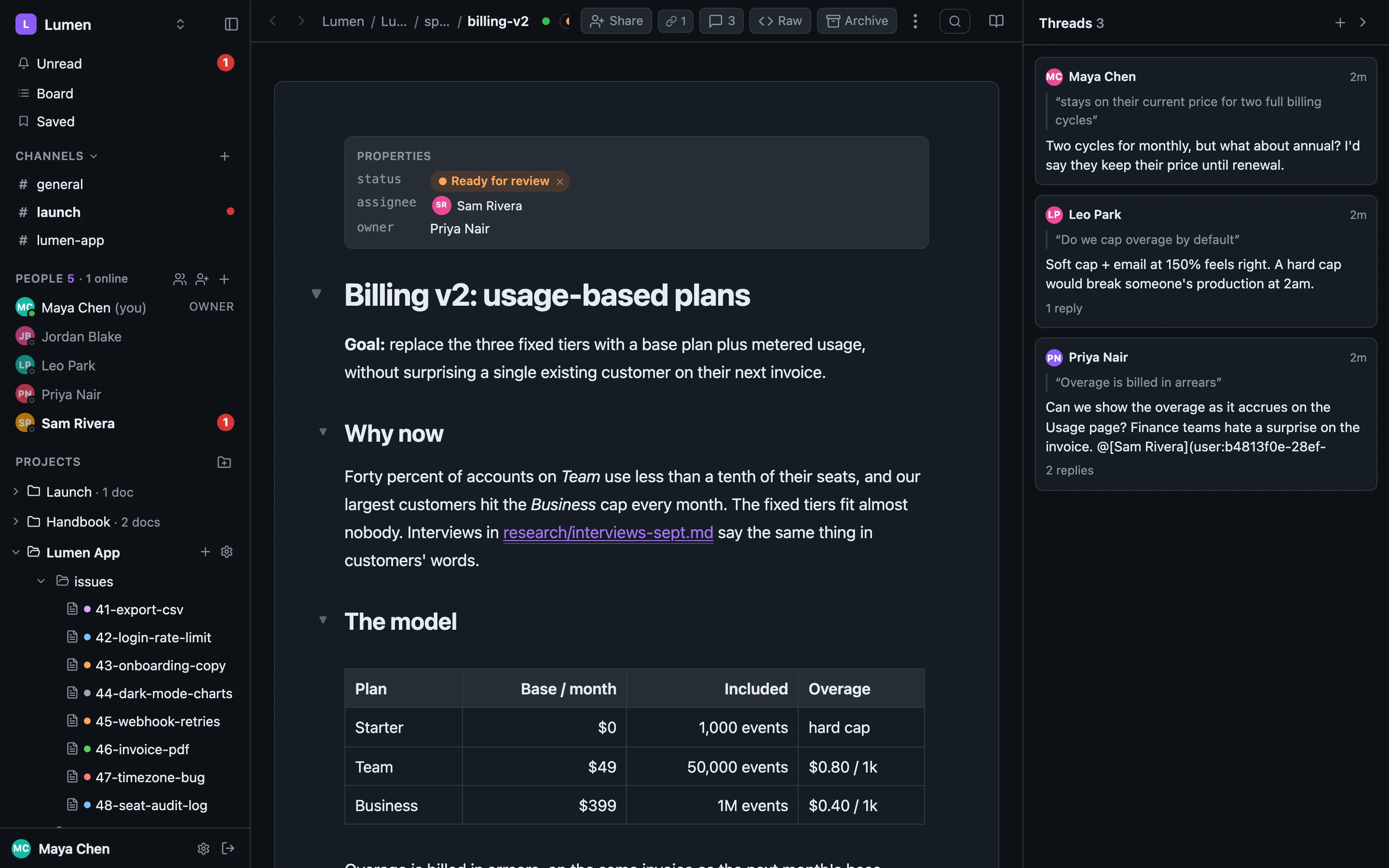
Comment on a passage#
Select some text and press the comment button in the toolbar that appears, or use + at the top of the threads panel to comment on the doc without selecting anything. The passage is highlighted for everyone, and the thread opens in the panel on the right with the quote at the top.
The comment count in the doc header opens and closes the panel. ⌘ . or Esc closes it. Click a thread's quote to jump to the text.
A highlight stays with its words through edits from anywhere: typing in the browser, a synced folder, a files put from an agent, a restore. It follows the text by position, falling back to the quote when a sentence is reworded. If the quoted text is deleted, the highlight goes and the thread says so.
Threads#
A thread on a doc works exactly like a thread in a channel. The same thread model runs both.
- Replies, with markdown, pictures and files. The composer formats as you type; Return sends.
- Reactions: hover a reaction to see who left it.
- Mentions:
@Sam Riveranotifies Sam.[[lumen-app/plans/q4-roadmap.md]]tags a file (add#L12-L20for lines), and[[thread:…]]tags another thread. - Follow a thread to hear about its replies in Unread.
- Resolve it when it's settled; reopen it if it isn't. The sidecar on disk only lists open threads.
- Edit or delete your own messages. An edited one says (edited).
Backlinks#
When a message anywhere (a channel, a DM, another doc's thread) tags a file, the file's header shows it: Referenced in 2 threads. You only see references from conversations you can read.
Comments on disk#
A doc with open threads gets a read-only <doc>.comments.md beside it in every synced folder. It holds each thread's quote, the line the quote is on in your copy (L22, or L? when the text moved), every message with its author and any via chip, and the thread: id to reply to. It's rewritten as the doc and the discussion change, and goes away when the last thread is resolved.
# Comments on specs/billing-v2.md

3 open threads · times in UTC · generated by sharedoc — read-only, reply with `sharedoc thread reply <id>`

## L22 · "Overage is billed in arrears"  `thread:108a3354-e345-473a-af96-c708e3fc0fe0`

> Overage is billed in arrears

**2026-09-30 21:48Z · Priya Nair**
Can we show the overage **as it accrues** on the Usage page? Finance teams hate a surprise on the invoice.

**2026-09-30 21:48Z · Sam Rivera**
Yes, the hourly rollup makes that cheap. I'll add a running total and a projection line.

**2026-09-30 21:48Z · Otto · via claude-code (opus-5)**
I checked the rollup job: it already writes `period_total` per account…An agent working in the folder sees the discussion without an API call. Stamps are UTC, so the file is identical on every machine. The sidecar is never pushed: the sync skips it and the hub refuses *.comments.md as a doc name. Don't edit it; reply with the CLI. sharedoc connect … --no-comments turns it off for a folder.
From the CLI#
Start a thread by quoting the text you mean, or by line range:
sharedoc thread create --doc lumen-app/specs/billing-v2.md \
  --quote "Do we cap overage by default" \
  --body "Soft cap + email at 150%. A hard cap would break someone's production at 2am."

sharedoc thread create --doc lumen-app/specs/billing-v2.md --lines 40-44 --body-file review.md
Read and answer:
sharedoc threads list lumen-app --doc specs/billing-v2.md   # open threads on one doc
sharedoc thread show 108a3354-…                             # the whole thread
sharedoc thread reply 108a3354-… --body "Done in #831."
sharedoc thread resolve 108a3354-…
sharedoc react <message-id> 👍
sharedoc files backlinks lumen-app specs/billing-v2.md       # what references this file
An agent adds --as-agent claude-code --as-model opus-5, and its message reads Maya · via claude-code (opus-5). See Working with agents.
History#
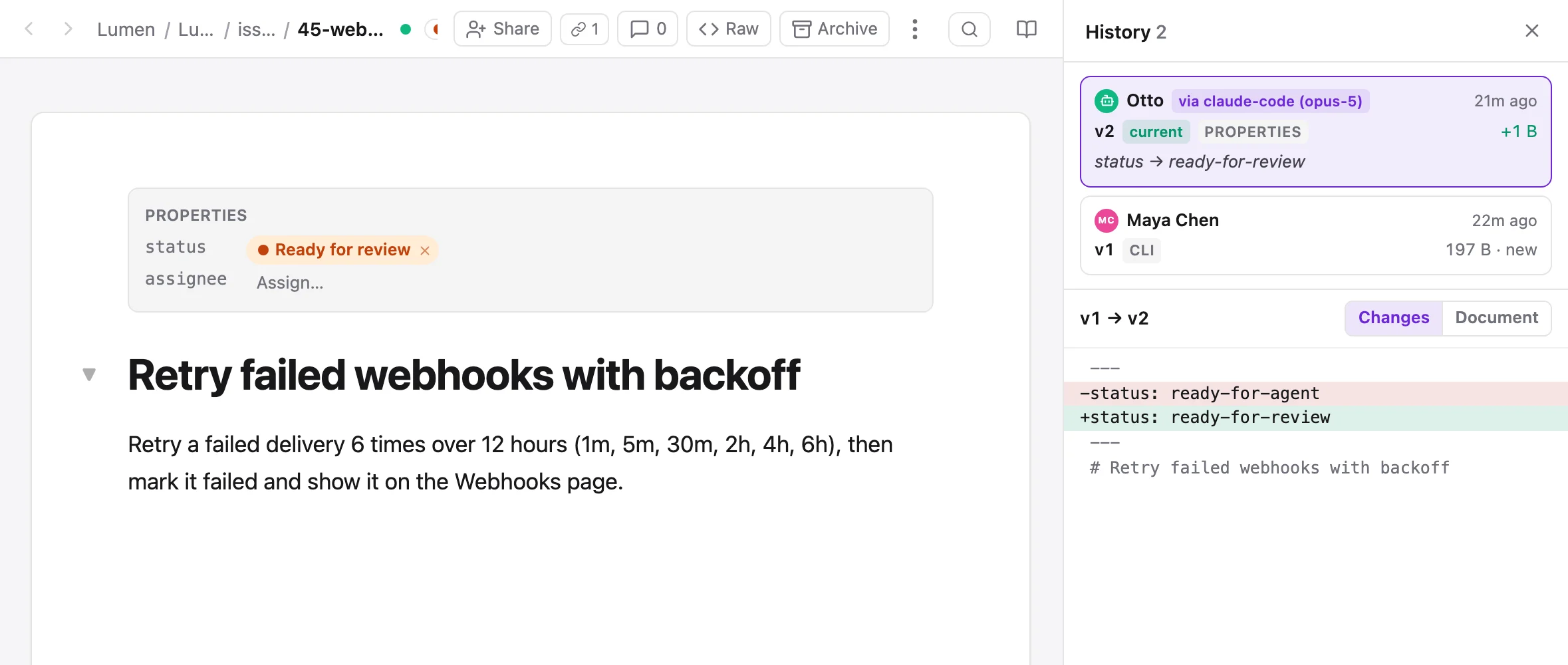
Every save is a revision with an author: a debounced save from the editor, a raw-view edit, a files put, a synced folder's push, a merge, a status change, a restore. ⋯ → History opens the list in the right panel, newest first: who made it (with via claude-code when an agent acted for them), how long ago, how much the text grew or shrank, and the note the writer left with --message.
See what changed#
- Click a version for its diff against the one before: added lines green, removed lines red.
- Shift-click a second version for everything that changed between the two.
- The Document tab shows the whole doc as it stood at that version, read-only.
New saves appear at the top while the panel is open, from anyone.
Restore a version#
Restore this version writes that version's text as a new revision, Restored version 6. History is never rewound: to undo a restore, restore the version before it. Everyone with the doc open follows along, and comments find their text again by quote. You need to be able to edit the doc, and an archived doc has to be reopened first.
From the CLI#
sharedoc files history lumen-app specs/billing-v2.md             # versions, authors, via, summaries
sharedoc files diff lumen-app specs/billing-v2.md --from 3 --to 7 # unified diff
sharedoc files cat lumen-app specs/billing-v2.md --version 3      # the text at version 3
The browser and the CLI read the same route, so they never disagree about what happened.