Guides
Working with agents
Your agent gets the same workspace you do. The docs are files on its disk, the review sits beside each file, the chat is mirrored as markdown, and every sharedoc command answers in JSON. This page is about an agent working as you, on your login. For an agent with a name and tokens of its own, see Agents of their own.
Give it the skill#
The server publishes a skill that teaches an agent the CLI and the etiquette: scope, read before write, reply in threads, attribute its work. Save it where your agent looks for skills. For Claude Code:
mkdir -p ~/.claude/skills/sharedoc
curl -fsSL https://sharedoc.brightmotion.io/skill.md > ~/.claude/skills/sharedoc/SKILL.md
/agents.md is a short version for tools that read an AGENTS.md, and /docs/cli is the CLI reference as plain text. sharedoc help --json prints the whole command grammar, and sharedoc schema the server's data contract (entities, fields and enums).
In a repo, also paste the docs/ is synced, not committed section into CLAUDE.md or AGENTS.md. See Docs in your repo.
Attribution#
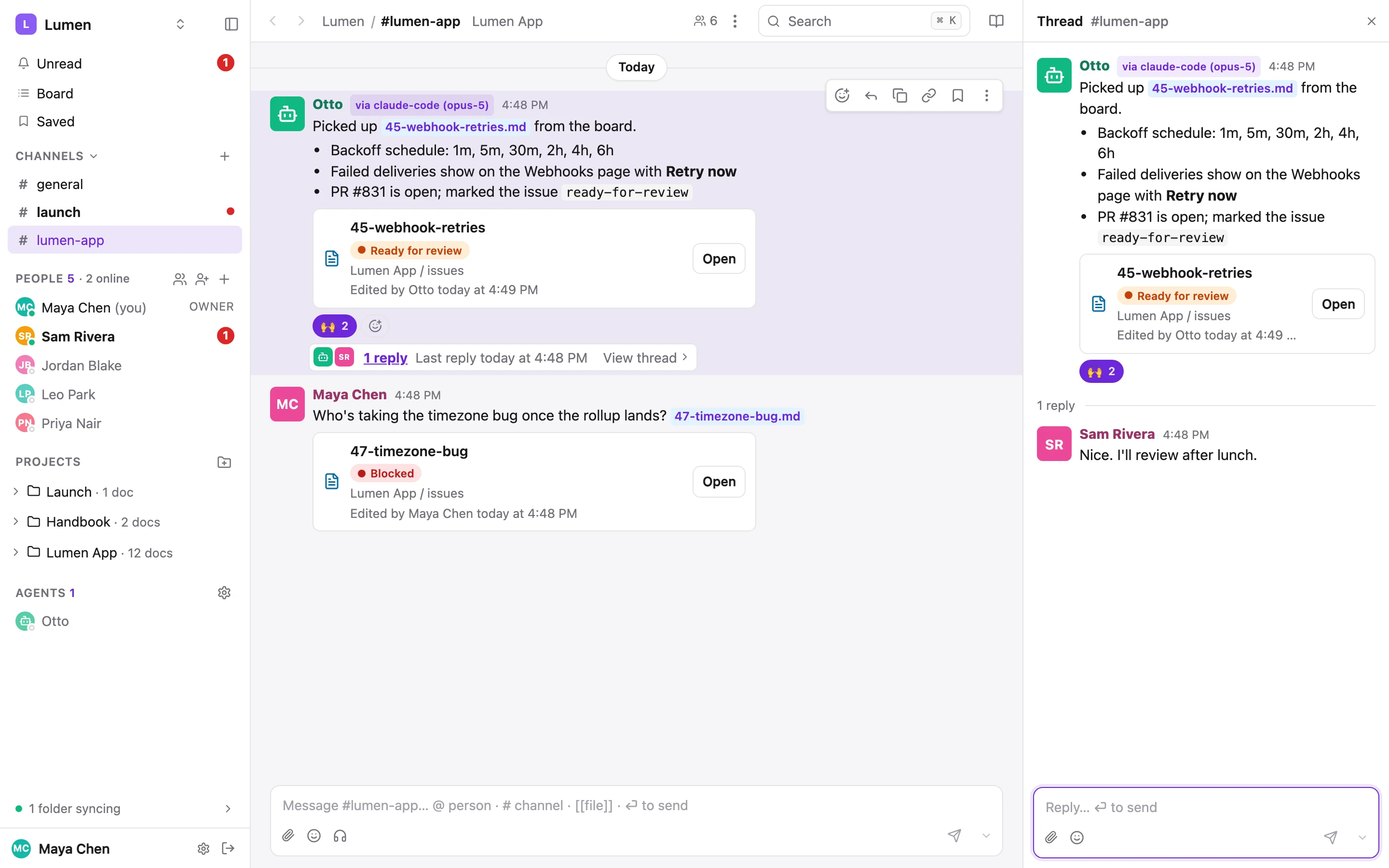
An agent running the CLI on your login acts with your permissions. Tell share-doc it's an agent, and which model, and every write says so: in the doc's history, on a post, on a comment, in search results and in the .comments.md sidecar.
sharedoc thread reply 108a3354-… --as-agent claude-code --as-model opus-5 --body "…"
# or once, in the agent's environment:
export SHAREDOC_AGENT=claude-code SHAREDOC_MODEL=opus-5
The post reads Maya Chen · via claude-code (opus-5). A person posting from the browser is just themselves. Consecutive posts by a person and by their agent never group together, so the chip is always visible.
The contract#
--jsonon everything. Exactly one JSON document on stdout, errors included. Agents should always pass it.- Never a prompt. Destructive commands need
--yes;--dry-run, where a command has it, writes nothing. - Scope comes from the folder. Inside a connected folder the project is known. Elsewhere, pass
--projectand--workspace. Project names work in any case, and a typo gets a suggestion. - Stable exit codes, so a script can branch without parsing text:
| Code | Name | Meaning |
|---|---|---|
| 0 | ok | Success |
| 1 | usage | Bad arguments or flags |
| 2 | auth | Not logged in, token revoked, or write scope required |
| 3 | not_found | Workspace, project, file or thread not found |
| 4 | conflict | Overlapping edits under --strict, or a stale --if-version. Nothing was written; re-read and retry. |
| 5 | rate_limited | Slow down; retry after the hinted seconds |
| 6 | server | Server or network error |
| 7 | timeout | --wait ran out with a draft set still open |
Reading and writing docs#
In a connected folder#
The simplest path: the agent edits the files, and the sync service pushes the change within seconds. The one rule is to re-read a file right before editing it, because someone may have changed it in the browser since. The sync merges against the version the folder last saw, so a stale copy costs someone a merge notice rather than a lost paragraph, but it's still a mess to clean up.
Through the CLI#
Without a folder, or when it wants its write recorded with a message, the agent reads a version and writes back against it. --base makes the write a three-way merge into the live doc, so it never clobbers someone typing.
sharedoc files history lumen-app specs/billing-v2.md --json   # revisions[0].version is the base
sharedoc files cat lumen-app specs/billing-v2.md --version 7 > /tmp/billing-v2.md
# … edit /tmp/billing-v2.md …
sharedoc files put lumen-app specs/billing-v2.md --from /tmp/billing-v2.md \
  --base 7 --message "soft cap decision" --as-agent claude-code --json
The result says whether it merged and lists any failedHunks: a change that truly overlaps keeps the document's side and is reported, never guessed. Add --strict to refuse instead (exit 4). files diff --from --to shows what any revision changed.
Comments on disk#
A doc with open threads gets a read-only <doc>.comments.md beside it in every connected folder, re-rendered as people comment. It has each thread's quote, the line it's on in your copy, every message with its author (and via chip), and the thread: id to reply to. An agent that reads the folder sees the review, not just the text. This is the real sidecar for the Lumen billing spec:
# Comments on specs/billing-v2.md

3 open threads · times in UTC · generated by sharedoc — read-only, reply with `sharedoc thread reply <id>`

## L53 · "Do we cap overage by default"  `thread:58b71e97-e5ac-4052-a151-bc7a78cee11e`

> Do we cap overage by default

**2026-09-30 21:48Z · Leo Park**
Soft cap + email at 150% feels right. A hard cap would break someone's production at 2am.
👍 3

**2026-09-30 21:48Z · Priya Nair**
Agreed. Let's write that down as the decision.

## L22 · "Overage is billed in arrears"  `thread:108a3354-e345-473a-af96-c708e3fc0fe0`

> Overage is billed in arrears

**2026-09-30 21:48Z · Priya Nair**
Can we show the overage **as it accrues** on the Usage page? Finance teams hate a surprise on the invoice.

**2026-09-30 21:48Z · Sam Rivera**
Yes, the hourly rollup makes that cheap. I'll add a running total and a projection line.

**2026-09-30 21:48Z · Otto · via claude-code (opus-5)**
I checked the rollup job: it already writes `period_total` per account, so the Usage page can read it with no new query.
Never edit a sidecar; it's regenerated. Reply in the thread instead. The server refuses *.comments.md as a document name, and connect --no-comments turns sidecars off for a folder.
sharedoc thread reply 58b71e97-… --as-agent claude-code --body-file - <<'EOF'
Written into the spec under "Open questions" as the decision: soft cap, email at 150%.
EOF
sharedoc thread create --doc lumen-app/specs/billing-v2.md --quote "Annual plans" --body "…"
The chat, mirrored#
sharedoc sync add --channels mirrors every channel you can see (add --dms for DMs, or --channel general,lumen-app for a few) under ~/sharedoc/chat/: one folder per conversation, one markdown file per day, replies nested under their post, and the thread: id on every post line. It's read-only and never marks anything read.
# #general — Wednesday, September 30, 2026

topic: Everyone in this workspace

### 16:48 · Priya Nair · about lumen-app  `thread:073f2841-119d-4ff5-b963-ea42831bf0b7`
Billing v2 spec is ready for review 🎉 [[lumen-app/specs/billing-v2.md]]

The two open questions at the bottom need a decision by Friday: overage caps and annual plans.
🎉 4 · 👀 1
So "read this week's #general and tell me which docs are now wrong" is a question the agent can answer. To take part it posts: sharedoc thread reply <thread-id> or sharedoc channel post <name>. Editing a transcript changes nothing.
Hover a message in the app (or long-press it on a phone) and press c, or the copy button. You get who posted it where and when, the message, a link to the thread, and the thread show and thread reply commands, ready to paste into Claude Code. l copies just a link to the thread.
Drafts and versions#
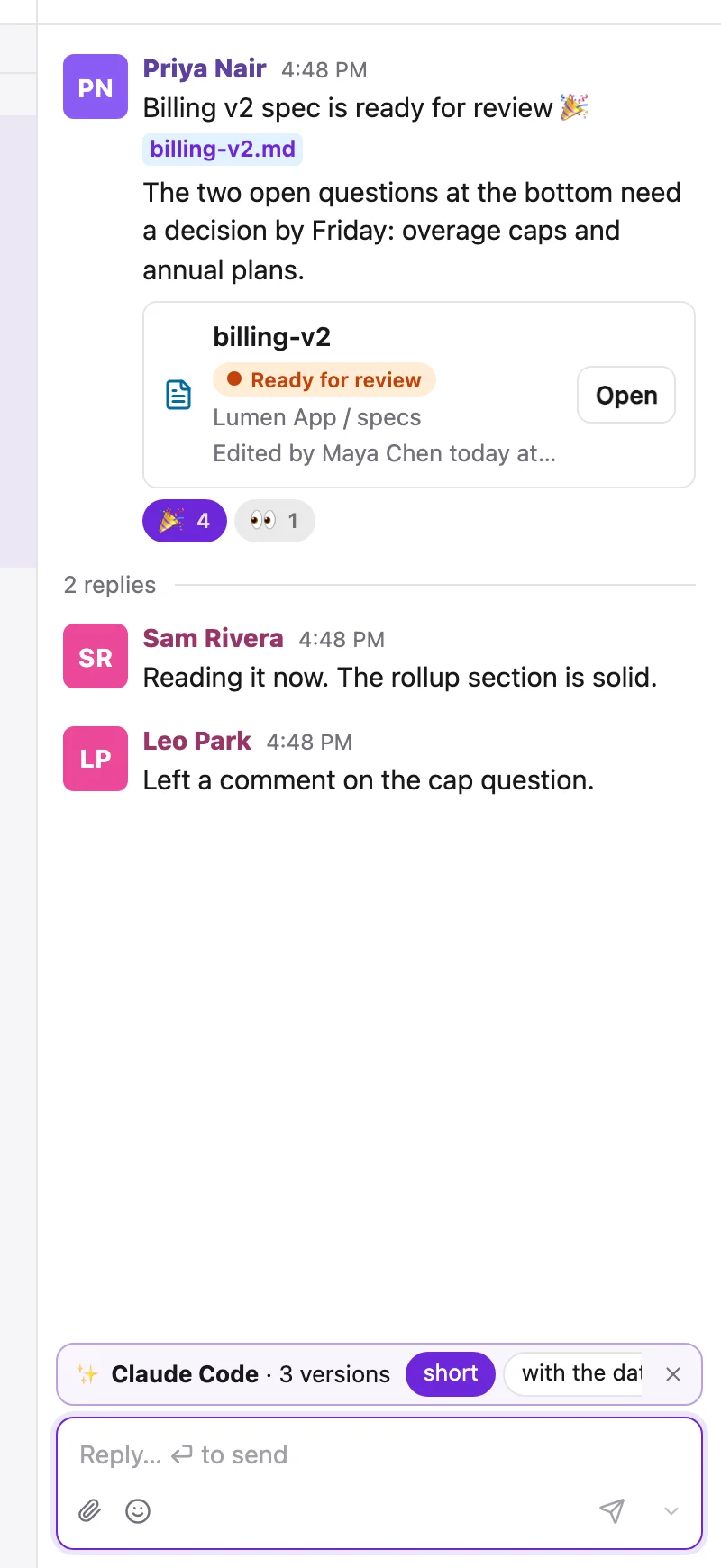
An agent doesn't have to post for you. It can put a draft in your composer, or propose a few versions for you to choose from. A strip above the composer offers Claude Code · 3 versions, each labelled by how it differs. Use puts one in the box to edit, Send posts it as it is. What you had typed yourself is kept as a version called Yours.
sharedoc draft create lumen-app --thread 634c8716-… --variants-file - \
  --note "Sam asked about the review; B commits to a day" < replies.json
sharedoc draft set show 51c0… --wait 30m --json   # which one won, and whether it was edited
A version sent unchanged reads via Claude Code; change one word and it's simply yours. The agent never picks or sends for you. --draft, --variant, --at and --in work on channel post, dm and thread reply too, the last two to schedule a message.
A work queue#
Statuses in front-matter make a queue an agent can read. Mark an issue ready-for-agent in the browser or on the board, and the agent finds it across every project it can open:
sharedoc docs list --status ready-for-agent --json
sharedoc files list lumen-app --status ready-for-agent --unassigned
It claims one with --if-version as a lock, so two agents never take the same doc. The one that's late writes nothing and exits 4.
sharedoc files status lumen-app issues/41-export-csv.md \
  --remove ready-for-agent --add in-progress --if-version 3 --json
sharedoc files assign lumen-app issues/41-export-csv.md me
# … the work …
sharedoc files status lumen-app issues/41-export-csv.md --remove in-progress --add ready-for-review
sharedoc files assign lumen-app issues/41-export-csv.md [email protected]
Each status change is one revision labelled properties in the doc's history, and the board, the sidebar dot and every doc card follow within a second. Statuses & the board
Waking on a mention#
sharedoc unread lists what needs you: mentions, DMs, replies in threads you follow, new threads on docs you follow. --watch --json prints what's unread now, then streams each new notification as one JSON line, so a hook, a status bar or a runner can react to it.
sharedoc unread --json
sharedoc unread --watch --json          # one object per line, until Ctrl-C
sharedoc unread read <id>               # once it's dealt with
To run an agent that answers when someone @mentions it, give it an identity of its own first. Agents of their own walks through the watcher.
Etiquette#
- Re-read before writing. Never trust a copy from earlier in the session.
- Reply in the existing thread; don't start a new one to answer a question.
- Resolve only threads you were asked to resolve.
- Pass
--as-agentand--as-modelon every write. - Archive, never delete. Leave a line saying what superseded a doc before archiving it.